Event Lead Capture

Lead Capture That Drives Exhibitor ROI

Happy exhibitors come back. Standardize lead capture across every booth, then streamline how you deliver lead retrieval reports after the event, so exhibitors get consistent, usable lead data.

With Accelevents, you can equip exhibitors to:

bullet point
Scan attendee QR codes or scan RFID badges in the Accelevents Attendee App
bullet point
Capture leads from booth visits, chats, downloads, and CTA clicks
bullet point
Organize leads with notes and ratings, then export lead data for follow-up
Book a demo
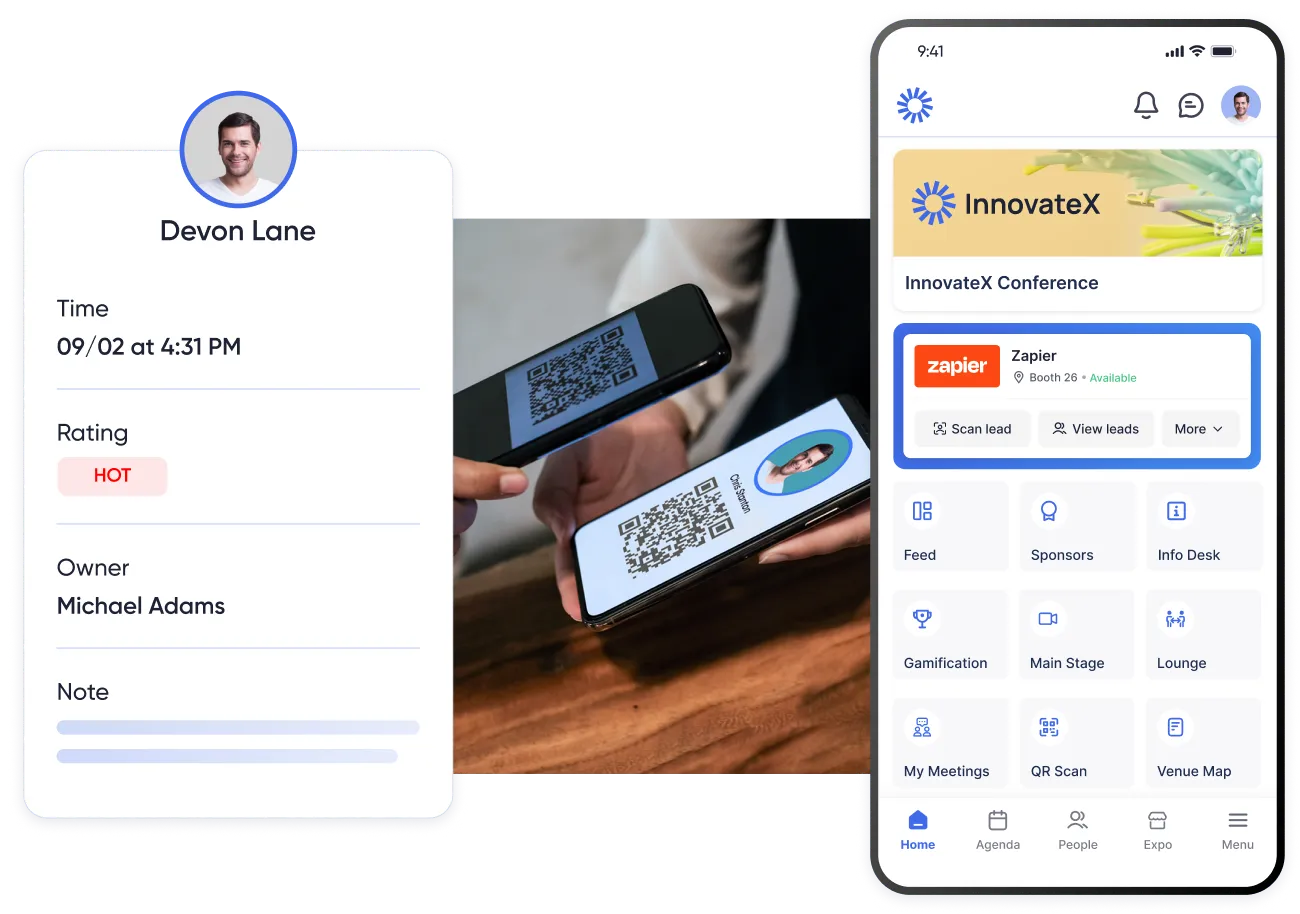
Event lead capture app interface showing QR code badge scanning, potential lead details, and lead retrieval reporting for exhibitors
Mobile event lead capture app scanning attendee QR codes on badges for exhibitor lead capture, lead collection, and lead retrieval on iOS and Android

Equip exhibitors to capture every lead

Instant lead capture from QR codes and RFID badges

Give your exhibitors a simple mobile lead capture app that keeps lead data clean across every booth. You control how much attendee data exhibitors can access, and exhibitors can qualify leads on the spot for better post-event follow-up.

bullet point
Add exhibitor admins and lead retrievers so multiple reps can capture leads for the same booth
bullet point
Manually add leads in the app, add notes, and save them directly to the booth leads list
bullet point
Take lead notes and set ratings tied to each rep for cleaner post-event follow-up

Meetings made easy

Offer a smoother way for event attendees and exhibitors to schedule time together. Pre-scheduled meetings help exhibitors prioritize the right leads and help you deliver more exhibitor value beyond booth traffic.

bullet point
Attendees book meetings with exhibitors from the app or event hub
bullet point
Exhibitors schedule onsite meetings and follow-ups
bullet point
Meeting requests stay connected to the exhibitor lead capture activity
Meeting scheduler in the event app that supports conference lead capture by turning booth interest into booked meetings

Support your exhibitors with real-time lead reports

Lead capture is only useful if it is easy to retrieve and act on. You can provide exhibitors access to leads on desktop or mobile, plus CSV exports, and use notes and ratings for lead management. See how each event lead was added, then use that context to prioritize follow-up.

bullet point
Provide a list of leads during the event on desktop or mobile
bullet point
Download leads as a CSV from exhibitor tools for marketing teams and sales teams
bullet point
Add notes and update lead ratings to score leads and prioritize follow-up
bullet point
Track lead source like booth visit, booth chat, direct message, CTA click, document download, or QR scan
bullet point
Download a CSV of booth leads for post-event follow-up and reporting to improve event ROI and track key metrics.
Accelevents software screens illustrate the best lead capture functionality for event planners and exhibitors focused on maximizing lead generation and lead capture - better than icapture
Event organizer configuring exhibitor lead retrieval access and lead data bundles to monetize lead capture at trade shows and conferences

Use your next event to monetize lead capture

Make lead capture a revenue stream. Offer lead retrieval as an exhibitor add-on, or sell lead data bundles that control what each exhibitor can access. This helps you package value while keeping lead management clean and consistent.

bullet point
Create lead capture and lead retrieval packages by exhibitor tier
bullet point
Control which lead fields are included in each bundle
bullet point
Add sponsor promotions that drive booth traffic and improve event ROI

Discover event management minus the stress

Accelevents connects ticketing and registration, check-in, and event lead capture in one platform, so your data stays clean from scan to follow-up. Offer exhibitors consistent lead capture and lead retrieval reports, and keep your event reporting clean across booths.

Request a Demo
Trusted by
g2 badge linking to list of online platforms containing remo, vfairs, Accelevents and other event platforms
capterra badge pointing to event and ticket sales platforms lists containing vfairs, bigmarker and other virtual platforms

FAQ

An event lead capture app helps event organizers give exhibitors and sponsors a way to collect lead information during an event and turn it into usable lead data for follow-up. It supports in-person lead capture through QR codes and virtual lead capture through booth engagement, plus lead management fields like notes, ratings, and lead source.

Event lead capture occurs during the event, when exhibitors collect contact information and engagement activity from attendees. Lead retrieval occurs after the event, when exhibitors access, review, and export lead data for outreach and reporting.

For in-person events, exhibitors capture leads by scanning attendee QR codes on badges, tickets, or inside the app. This makes onsite lead collection faster than business card scanning and helps protect the event experience by keeping lines moving.

Leads can be added in several ways depending on the event setup and organizer settings. Typical lead sources include booth visit (if enabled), booth chat messages, direct messages to an exhibitor, file downloads inside the booth, CTA clicks, and QR code scans during onsite events.

As a default, exhibitors can capture a lead’s name and email address. When available, scanning may populate additional details like phone number. Organizers can include additional registration fields that may appear during scan and be included in downloadable lead reports.

Yes. Exhibitors can add notes and use lead ratings to qualify and prioritize follow-up. Notes preserve context from booth conversations, so follow-up is more relevant.

Exhibitors can view leads in the booth leads list, manage lead details with notes and ratings, and download lead data as a CSV for reporting and post-event follow-up.

Yes. Attendees who are not yet checked in can still be added as leads through scanning or manual entry in the app. Adding a lead does not check the attendee into the event.