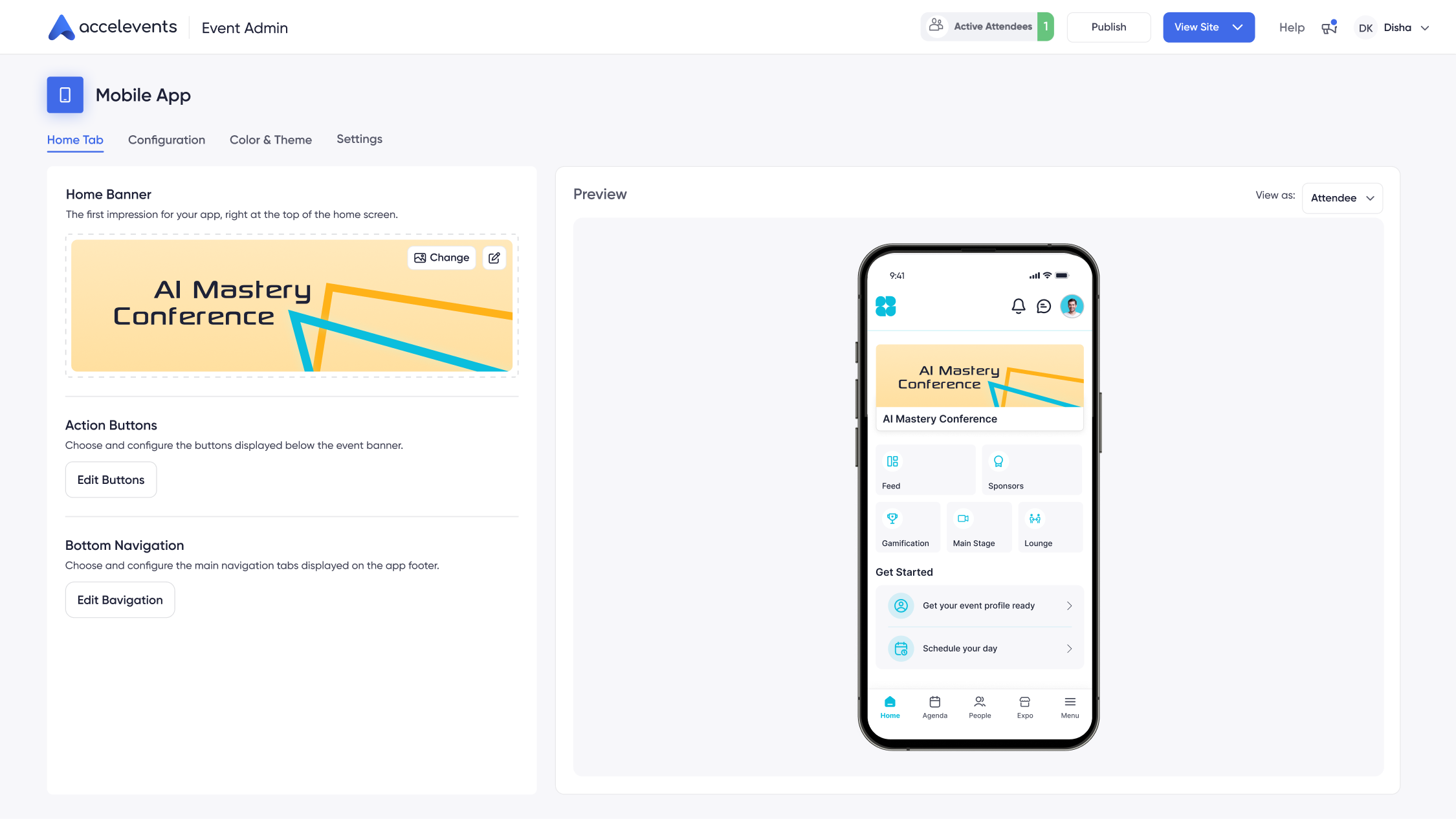
Choosing a mobile event app feels straightforward until you start comparing platforms and realize each one takes a very different approach to attendee engagement, data management, and integrations. What looks like a simple decision about push notifications and agenda builders quickly becomes a question about your entire event technology strategy. This comparison focuses on how Accelevents and Amego approach mobile event apps for enterprises, associations, and others including agencies, mid-market corporations, and nonprofits. It will help you evaluate platforms, compare real-world workflows, and prepare for live demos and proofs of concept with your shortlisted vendors.

Amego vs Accelevents mobile app overview
Both Accelevents and Amego deliver mobile event apps with core features such as networking, gamification, and real time updates. Amego focuses on serving as a mobile engagement layer that sits on top of your existing event stack, connecting to external registration systems and onsite tools. Accelevents brings the mobile experience into the same environment as registration, onsite check in, and analytics, so changes in one place are reflected everywhere without data sync steps.
Built on one consistent data model across registration, onsite, mobile, and virtual, creating a seamless experience for event organizers, attendees, exhibitors, and speakers. More than 1,847 customers use Accelevents for conferences, trade shows, fundraisers, internal meetings, and continuing education events, often as a way to consolidate multiple tools into a single platform. Where Accelevents can benefit enterprises and associations is in programs that want mobile engagement to be part of a connected journey, rather than a separate point solution.
How to evaluate a mobile event app
When you evaluate mobile event apps, it helps to look beyond feature checklists and focus on how the app will work on show day. You are choosing the tool that attendees will use to find rooms, build schedules, connect with exhibitors, and respond to live content. The right fit depends on whether you want a standalone mobile layer or a fully connected event platform, and how much admin effort your team can support. You should also think about exhibitor expectations, data capture needs, and how easily you can reuse a setup for future events. The areas below give a practical structure you can follow as you compare Accelevents and Amego in live demos.
- App setup, branding, and white label options
- Event registration and onsite check in
- Agendas, session management, and continuing education tracking
- Networking and meetings
- Exhibitor tools and lead capture
- Engagement features, notifications, and gamification
- Integrations, API, and payments
- Analytics and reporting
- Pricing, implementation, and support
1) App setup, branding, and white label options
Accelevents
The Accelevents mobile app can be configured with your colors, logos, banners, and module visibility so that attendees recognize your event immediately. Full white label branding is available across web, mobile, and virtual environments with customizable themes, and the app can be listed under your own developer account to keep the experience aligned with your brand. Because the mobile app is part of the same platform as registration and onsite tools, you set up branding once and reuse it across future events without rebuilding every screen.
Accelevents was intentionally built so that the mobile app, onsite check in, and exhibitor tools share layouts and patterns that are easy for staff to learn. This helps teams that support multiple events per year avoid retraining for each new show and makes it easier to roll out consistent experiences across a portfolio.
Amego
Amego is a mobile event platform created to boost engagement at conferences, trade shows, and corporate events, and branding is one of its strengths. It gives organizers control over fonts, colors, home screens, and layouts, so teams with detailed brand guidelines can match specific visual requirements. The app plugs into your existing event management system, so you design the app while your registration and onsite processes continue to run in their own tools.
Because Amego is focused on the mobile layer, you can experiment with different home screen layouts, icons, and content blocks from event to event without changing your registration platform. This appeals to design driven teams that see the app as an extension of their creative work for each program.
Why this matters
Branding is one of the first things attendees notice when they download your app, and it sets expectations for the rest of their experience. Strong control over visuals helps you present a polished program to sponsors and executives, and it also reduces confusion when attendees compare what they see onsite with what they see on their phones. In demos, ask each vendor to:
- Configure a branded home screen with your colors, logo, and key navigation tiles.
- Show how to hide or show modules such as networking, exhibitors, or surveys for different event types.
- Publish a test app or test build and explain how app store submissions and updates are handled.
- Demonstrate how a look and feel can be cloned from one event to another without rework.
2) Event registration and onsite check in
Accelevents
Accelevents supports event registration and onsite check in in the same workflow. Attendees purchase tickets or register on forms that you build with drag and drop pages, badges, and conditional form logic that adapts to different attendee types. Unlimited ticket types and discount codes, reusable templates, one click registration forms, payment processing, and conversion tracking give you granular control over how people enter the event.
Onsite, attendees receive QR tickets in the mobile app, and staff can scan them using smartphones or tablets to check people in at the door. The same scan can trigger badge printing, and group ticket bundles make it simple for teams or sponsors to bring multiple guests. Because registration and check in all sit inside one platform that was originally built for in person events and now supports virtual and hybrid formats, there is no need to reconcile separate lists before doors open.
Amego
Amego provides QR codes that attendees can show at check in, and the app connects to external kiosks or scanning hardware that your registration provider manages. This works well if you already have a preferred onsite vendor or you are committed to a particular registration system. The mobile app reflects attendee status coming from those external tools, so you can show whether someone is registered, on a waitlist, or has already been scanned.
Since Amego layers on top of your existing event management stack, you will rely on your current registration platform for payment flows, financial reporting, and badge rules. This can keep things familiar for teams that do not want to change those core processes, although it means you need to pay attention to how and when data syncs between systems before the event starts.
Why this matters
Registration and check in are the first real contact points between your attendees and your technology, and any friction here shows up as lines and frustration. A mobile app that handles tickets, scanning, and badges in a connected way reduces manual work for staff and cuts down on import and export cycles. In demos, ask vendors to:
- Build a registration form with multiple ticket types, discount codes, and conditional fields for different attendee categories.
- Show how a newly registered attendee appears in the mobile app, including how quickly QR tickets are issued.
- Scan test attendees at check in, print badges, and display a real time attendance view.
- Explain how group registrations are handled from purchase through onsite scanning.
3) Agendas, session management, and continuing education tracking
Accelevents
Accelevents lets attendees browse the agenda by day, track, room, or topic and create personal schedules directly in the mobile app. Organizers can update sessions during the planning phase or mid event, and changes flow to attendee devices in real time. Because capacity rules and check ins are connected to the same system, you can manage session limits and waitlists without juggling separate tools.
For programs that award credits, Accelevents supports continuing education credits with automated credit assignment, a flexible program builder, instant certificate generation, self service retrieval, audit trails, and LMS integration. The mobile app tracks attendance and time in session, then feeds that data into credit rules so you can issue certificates without manual reconciliation.
Amego
Amego allows attendees to filter sessions by day, topic, or speaker to build their preferred schedule. The mobile app sends reminders before sessions start and can highlight featured sessions or tracks that you want to promote. When organizers update the agenda in the connected event system, those changes sync into the app to keep attendees aligned with the latest version.
For continuing education requirements, you will typically rely on your underlying registration or learning tools to manage credits and certificates. Amego provides the engagement and attendance signals from the app, which you can combine with your other systems as part of your overall workflow.
Why this matters
Clear, accurate schedules reduce the number of questions your staff handle at information desks and help attendees move confidently through crowded venues. When session data ties directly to attendance and credits, it also simplifies reporting for sponsors and professional associations. During demos, ask vendors to:
- Create a multi track agenda, including overlapping sessions and room assignments, then show how it appears on mobile.
- Change session times and speakers and demonstrate how quickly updates reach attendee devices.
- Check in test attendees to sessions and show how attendance appears in reports and credit rules.
- Generate a sample certificate or completion record and walk through how it would be delivered after the event.
4) Networking and meetings
Accelevents
The Accelevents mobile app includes AI powered recommendations that suggest people, sessions, and exhibitors based on profile fields and registration data. Attendees can send direct messages, bookmark contacts, and join speed networking rounds where they meet new people in timed conversations. Meeting requests, confirmations, and reminders all live inside the app so participants do not need to jump between tools to manage their schedules.
Organizers can configure networking spaces for different groups, such as executive programs or sponsor hosts, and monitor engagement levels to see which formats drive the most connections. Because networking activity feeds into the same analytics as registration and sessions, you can understand which segments are most active.
Amego
Amego provides directories where attendees can find other participants, send direct messages, and request one to one meetings. The platform uses AI to schedule meetings based on mutual availability and to prevent conflicts with sessions that attendees have already added to their agendas. For events where curated meetings are central to the value proposition, this scheduling engine can be a significant benefit.
Networking spaces in Amego can be configured around topics, roles, or interests, which helps participants find relevant conversations. Organizers can promote curated meetups or lounges within the app to drive foot traffic to specific areas of the venue.
Why this matters
Networking is often the top reason people attend conferences and trade shows, so your app needs to make it easy to find and connect with the right people. Effective tools reduce the coordination burden on staff and help attendees feel that they achieved their goals. In demos, request that vendors:
- Set up AI driven recommendations and explain what data fields power the matching logic.
- Walk through sending, accepting, and rescheduling meeting requests between two test profiles.
- Demonstrate a speed networking or round based networking format from both attendee and organizer views.
- Show how networking data appears in post event analytics and how you can export those insights.
5) Exhibitor tools and lead capture
Accelevents
Accelevents includes exhibitor management as part of the platform, with a comprehensive exhibitor portal where sponsors manage digital booths, upload media, coordinate staff, and track ROI. Lead capture is built into the attendee app with mobile QR scanning, unlimited users, offline support, real time reports, lead scoring, note taking, and integrated meeting booking. Exhibitors can scan badges on their own devices without extra hardware licenses and sync leads to systems such as Salesforce, HubSpot, or Marketo during the event.
Because exhibitor profiles, session sponsorships, and leads are all stored in the same environment, organizers can report on which sponsorship packages and placements generate the most engagement. This supports more precise renewal and upsell conversations for future events.
Amego
Amego supports lead scanning through its mobile app and can connect to external lead retrieval systems that some venues or registration providers supply. Exhibitors scan attendee badges, capture basic contact information, and then export leads once the event is over. This approach lets you keep using existing lead hardware or providers that your exhibitors already know.
However, relying on separate lead tools can introduce additional steps for mapping fields, setting up device licenses, and combining reports after the event. Some teams report that they spend extra time aligning lead data from Amego and their registration platform to produce a complete view.
Why this matters
Exhibitors judge an event largely by the quality and quantity of leads they take home, so your mobile app has a direct impact on sponsor satisfaction. If lead capture is easy and reliable, exhibitors are more likely to renew and increase their investment. During vendor evaluations, ask each platform to:
- Log in as an exhibitor, configure a booth profile, and assign staff members with different permissions.
- Scan multiple test badges on different devices, including at least one offline scenario, then show how leads sync when connectivity returns.
- Add notes and qualifiers to leads and demonstrate how those fields map into your CRM or marketing automation platform.
- Produce a sample sponsor report that shows lead counts, engagement, and meetings booked by exhibitor.
6) Engagement features, notifications, and gamification
Accelevents
The Accelevents mobile app includes interactive polling, Q&A, surveys, chat, and forums to keep attendees engaged during sessions and throughout the venue. Speakers can launch polls from the stage and see results in real time, while moderators manage Q&A queues and filter questions. Post session surveys help content teams refine tracks for future events.
Gamification tools allow organizers to set up points and challenges tied to actions such as attending sessions, visiting booths, answering polls, or posting in discussion spaces. You can run individual or team based competitions, with leaderboards that refresh live and are visible in the app. Targeted push notifications reach specific segments based on registration data or behavior, for example attendees who visited a sponsor booth or checked into a particular breakout.
Amego
Amego provides live polling where speakers can ask questions and see results during sessions. Attendees submit questions through the app, and moderators can choose which ones appear on stage. The app supports a Quest system that awards points when attendees complete activities such as booth visits or session attendance, and leaderboards display top performers to keep interest high.
Push notifications in Amego can be targeted to specific groups so you can send schedule changes, emergency alerts, or sponsor messages without overloading the entire audience. Messaging tools support direct conversations between attendees and can highlight featured activities or spaces at the event.
Why this matters
Engagement features are what keep your app open on attendee phones instead of buried in a folder. When polls, Q&A, and challenges are easy to access, participants are more likely to interact with content, which in turn provides better data to your team. When you evaluate vendors, ask them to:
- Run a sample live poll and Q&A session, then display engagement metrics on an organizer dashboard.
- Configure a basic gamification program with points for sessions, booths, and posts, and show how leaderboards update.
- Send targeted push notifications to a small test group based on behavior or ticket type.
- Demonstrate how attendees find and use chat or discussion areas during a busy program day.
7) Integrations, API, and payments
Accelevents
Accelevents offers native integrations at no additional cost, including deep connectors to Salesforce, HubSpot, Marketo, and multiple association management systems. Public REST APIs and webhooks are available without fees for API access, so technical teams can extend the platform where needed without navigating complex licensing. Because mobile engagement, registration, onsite activity, and virtual participation sit in the same environment, most everyday data flows do not require middleware.
For payments, Accelevents processes ticket sales and registration fees through gateways such as Stripe, so attendees complete purchase and mobile app onboarding in a single flow. This reduces drop off compared with sending registrants through disconnected forms or separate payment pages.
Amego
Amego is designed to work alongside existing event management systems, so integrations are central to its approach. It connects to various registration platforms and CRM tools through APIs or third party middleware, which can be helpful if you are standardizing on a particular vendor and just need mobile engagement on top.
Payment processing usually lives in the underlying registration system that Amego connects to, rather than in the app itself. Amego provides API access for custom integrations, although in many deployments you will lean on your other tools for the most complex data flows and use Amego primarily to pass engagement data back into the stack.
Why this matters
Integrations determine whether your mobile app becomes another data silo or a connected part of your marketing and sales ecosystem. Strong APIs and direct connectors reduce time spent managing files and troubleshooting sync issues. In demos, request that each vendor:
- Connect to a sandbox CRM instance and show how registration, attendance, and lead data flow into contact records.
- Explain how authentication, permissions, and field mapping are managed for integrations.
- Walk through public API documentation and build a simple example call relevant to your use case.
- Show how payment status or refunds appear in reports that include mobile engagement metrics.
8) Analytics and reporting
Accelevents
Accelevents provides real time, shareable analytics that unify data across registration, onsite, mobile, and virtual components. Dashboards display app adoption, check ins, session attendance, booth visits, networking activity, and engagement with polls or surveys in one place. Because everything is driven from a single data set, you avoid the mismatched counts that can happen when mobile and registration tools report different numbers.
Reports can be shared with stakeholders in read only formats, exported as CSV files, or pushed into external tools through integrations. This supports executive summaries, sponsor reporting, and internal debriefs without requiring manual spreadsheet merges.
Amego
Amego uses Google Analytics and its own dashboards to track app usage, session engagement, and feature adoption. Organizers can monitor downloads, active users, and interaction patterns as the event unfolds, then export that data after the program. These insights help content and marketing teams understand which sessions or activities generated the most interest.
Because Amego often relies on external tools for registration and onsite operations, you will typically combine its engagement reports with data from your other systems to build a full picture of performance. This can introduce some manual effort, especially for multi day or multi track conferences.
Why this matters
Clear analytics help you defend budgets, adjust programming, and show sponsors that they achieved their goals. Real time views also give you a chance to react during the event, for example by promoting under attended sessions or rebalancing room assignments. In your evaluations, ask vendors to:
- Display real time dashboards for adoption, check ins, and engagement during a simulated event day.
- Export registration, session attendance, and lead data and show how fields align across files.
- Share or schedule reports to external stakeholders without granting full admin access.
- Explain how long analytics data is retained and how it can be anonymized or deleted.
9) Pricing, implementation, and support
Accelevents
Accelevents offers transparent, scalable pricing with pay only for what you need modules and no surprise add ons. Since the platform covers registration, onsite operations, mobile engagement, and virtual experiences, many teams use it to replace several separate tools, which can simplify vendor management and reduce overlapping contracts. Organizations of all sizes, including large enterprises, mid market corporations, associations, agencies, and nonprofits, use the platform when they want a single system they can expand into over time.
Implementation focuses on setting up core data structures, registration workflows, and mobile configurations so that future events can be cloned. Many teams are able to launch their first full program in a matter of weeks. Accelevents is known for reliability with no references to outages in reviews, and its support team that responds in less than 21 seconds, 24/7. Teams often highlight the customer success resources that help them roll out new capabilities between event cycles.
Amego
Pricing for Amego is typically quote based and depends on attendee counts, features, and integration scope. Since it is designed to complement existing event management systems rather than replace them, you will want to factor in the combined cost of Amego plus your registration and onsite providers. Some organizations like this model because it lets them select a mobile provider without changing long standing relationships with other vendors.
Implementation timelines are often short if your registration and onsite systems are already configured, because Amego layers on top of that infrastructure. Training tends to focus on mobile engagement features, networking workflows, and analytics views. Ongoing support is available through multiple channels, and users often mention that staff are responsive when issues arise.
Why this matters
Pricing, implementation, and support determine how quickly you can roll out a new mobile app and how smoothly your team can operate during live events. A platform that reduces vendor sprawl and offers fast, knowledgeable assistance can lower risk for complex programs. When comparing Accelevents and Amego, ask each vendor to:
- Outline all expected fees, including any integration, API, or lead capture costs, and clarify contract terms.
- Provide an implementation timeline with clear milestones from kick off to first event go live.
- Describe training resources for admins, exhibitors, and onsite staff, including how often materials are updated.
- Explain support coverage during live events and show examples of how critical issues are handled.
Decision guide
Accelevents is typically the better fit for teams that want a unified platform rather than a standalone mobile layer. If you are looking to streamline your stack so that registration, onsite check in, mobile engagement, exhibitor tools, and analytics all live in one place, the platform bridges complex enterprise features and ease of use, delivering a balanced, highly customizable, all in one event solution. This approach also suits programs where data governance and consistent reporting across events are priorities.
Amego can be a strong option if your organization already has significant investments in registration and onsite systems and you want to keep those tools in place. In that scenario, Amego adds a dedicated mobile engagement layer without forcing you to rework upstream registration flows. You will need to be comfortable managing integrations and combining reports from multiple systems, especially for large portfolios.
If your portfolio includes many repeat events with similar formats, Accelevents can reduce admin overhead by letting you clone entire setups and keep data models consistent across shows. If each event is highly bespoke and driven by different departments that own their own systems, Amego’s role as a separate layer may align better with existing governance structures.
Side-by-side comparison
The table below summarizes how the Accelevents and Amego mobile apps compare across key feature areas that matter on show day, from home screen design and search to lead capture, analytics, and integrations.
Implementation checklist for live demos
As you move into proofs of concept and live demos with Accelevents and Amego, use the checklist below to see how each platform performs on workflows that matter on show day.
- Build a branded home screen with your logo, colors, and tiles for agenda, networking, sponsors, and maps, then publish it to a test environment.
- Create a multi track agenda, adjust times and rooms, and demonstrate how quickly changes appear on attendee devices.
- Register several test attendees, issue mobile QR tickets, and check them in on different devices, including one connected to badge printing.
- Run a live session with polls, Q&A, and a post event survey, then show how engagement metrics appear in analytics dashboards.
- Log in as an exhibitor, scan test badges on multiple devices, add notes and qualifiers, and push leads into a sandbox CRM.
- Configure a simple gamification program and leaderboards, then prove that points update in real time as actions are taken.
- Send targeted push notifications to specific segments based on behavior, such as attendees who missed a session or visited a sponsor booth.
- Export CSV files for registration, session attendance, and leads, and validate that fields align with your CRM or marketing automation platform.
Migration considerations
If you are moving from a simple web only schedule or a basic app, adopting a full platform like Accelevents means aligning ticket types, attendee roles, and exhibitor objects with a richer data model. It is helpful to start with a single flagship event, define standard field sets, and then roll those patterns out across additional programs. Training staff on how mobile, onsite, and registration components fit together will reduce surprises when you go onsite.
For organizations that already have a mobile app and are considering a change, pay close attention to how historical data will move between systems. You may choose to migrate only core contact and engagement fields while keeping raw exports from legacy tools for reference. Mapping lead qualifiers, session identifiers, and sponsorship packages into the new environment will make year over year reporting more consistent.
Before any major event, run offline tests and push notification drills to confirm that the mobile app behaves as expected when connectivity is limited. Segment test audiences for alerts, verify that only the right people receive them, and check that staff devices can still scan tickets and badges when networks are congested. Finally, build a short training path for onsite teams, exhibitors, and speakers so that everyone knows how to use the app features that matter to them.
Conclusion
Accelevents and Amego both deliver capable mobile event apps, but they differ in how deeply they connect to the rest of your event technology stack. Accelevents centers the mobile experience inside a unified platform for registration, onsite operations, exhibitor tools, and analytics, which is well suited to teams that want fewer vendors and consistent data across events. Amego focuses on enhancing existing setups by adding a mobile layer that integrates with registration and onsite providers you already use.
For organizations that want to simplify data flow, reduce manual reconciliation, and give staff one environment to learn, Accelevents often offers the clearer path. For teams that are heavily invested in established registration tools and prefer to add mobile capabilities on top, Amego can be a practical choice, provided you are comfortable managing integrations and combined reporting. Ultimately, your decision will hinge on how you balance admin effort, data model alignment, exhibitor licensing expectations, onsite operations, and the level of analytics your stakeholders expect after each program.
To see how a connected mobile app and event platform can support your next conference or trade show, request a demo.
FAQs
How does Accelevents compare to Amego for organizations with existing event systems?
Accelevents is described as a unified platform that can handle registration, onsite check in, mobile engagement, exhibitor tools, and analytics in one environment, which some teams use to replace several separate tools. Amego is positioned as a mobile engagement layer that sits on top of existing registration and onsite systems, allowing organizations to keep long standing vendor relationships while adding an app. Choosing between them depends on whether you want to consolidate or maintain a broader stack. Both approaches require attention to how data flows across your systems.
Which is better, Accelevents or Amego, for unified registration and onsite check in?
Accelevents combines registration and onsite check in in a single workflow, with ticketing, QR codes, badge printing, and attendance tracking all managed inside the same platform. Amego surfaces QR codes in its app but relies on external kiosks or scanning hardware from your registration provider, so payments, badges, and financial reporting remain in that underlying system. If you want registration and check in to be tightly connected to your mobile app without manual list reconciliation, Accelevents takes that integrated approach. If you prefer to keep an existing registration tool unchanged, Amego layers mobile access on top of it.
How do Accelevents and Amego differ in exhibitor lead capture capabilities?
Accelevents includes exhibitor management and lead capture as part of the core platform, with in app QR scanning, unlimited users, offline support, notes, qualifiers, and real time syncing to tools like Salesforce, HubSpot, or Marketo. Amego supports lead scanning through its app but often connects to external lead retrieval systems, with exhibitors exporting and reconciling leads after the event. This means Accelevents centralizes exhibitor profiles, sponsorships, and leads in one environment for easier reporting. With Amego, organizers may spend more time aligning lead data from different providers to create a complete picture.
What are the key differences between Accelevents and Amego analytics and reporting?
Accelevents offers real time, shareable analytics that unify registration, onsite activity, mobile engagement, virtual components, and leads in a single set of dashboards. Amego tracks app usage and engagement through Google Analytics and its own views, which organizers then usually combine with reports from separate registration and onsite systems. As a result, Accelevents reduces the risk of mismatched counts between tools because everything runs on one data model. With Amego, you gain insight into mobile interactions but should plan for additional manual work to merge data across platforms.
When should enterprises or associations choose Accelevents over Amego for mobile apps?
Accelevents is typically the better fit for enterprises and associations that want a unified event platform, where registration, onsite operations, mobile engagement, exhibitor tools, and analytics are managed together with consistent data models. Amego may be preferable when different departments already rely on established registration and onsite systems and governance favors keeping those tools while adding a separate mobile layer. Programs that need repeatable setups, portfolio wide reporting, and streamlined vendor management are aligned with the way Accelevents is described. Highly bespoke events that must plug into varied existing systems may find Amego’s mobile only approach easier to slot into their current stack.