Choosing a mobile event app often feels like comparing similar feature lists, but the differences become clear once you look at how each product supports your full event program. This comparison focuses on how Accelevents and Eventee perform for enterprises, associations, and others such as agencies, mid-market companies, and nonprofits that need reliable onsite mobile experiences. You will see how each platform handles setup, engagement, exhibitors, analytics, and integrations, and how those workflows play out on show day. Use this guide to prepare detailed evaluation criteria, compare live demos, and plan proofs of concept for your next conference or trade show.

How to evaluate a mobile event app
A mobile event app is no longer just a digital program. It shapes how attendees navigate venues, connect with peers, and interact with sponsors, and it shapes how your team runs the onsite operation. The right app should be quick for staff to configure, easy for attendees to adopt, and tightly connected to registration, check in, and lead capture. It should also give you clear, real time insight into what is happening throughout the event. When you evaluate options, focus on how each capability will perform during busy check in periods, room changes, and sponsor activations.
Key evaluation areas that this article will use are:
- App creation and branding
- Agenda and personalization
- In-app engagement and networking
- Exhibitor tools and lead capture
- Continuing education credits and attendance tracking
- Analytics and reporting
- Integrations, reliability, and data flow
- Onsite check in, badging, and staff tools
- Pricing and scalability
1) App creation and branding
Accelevents
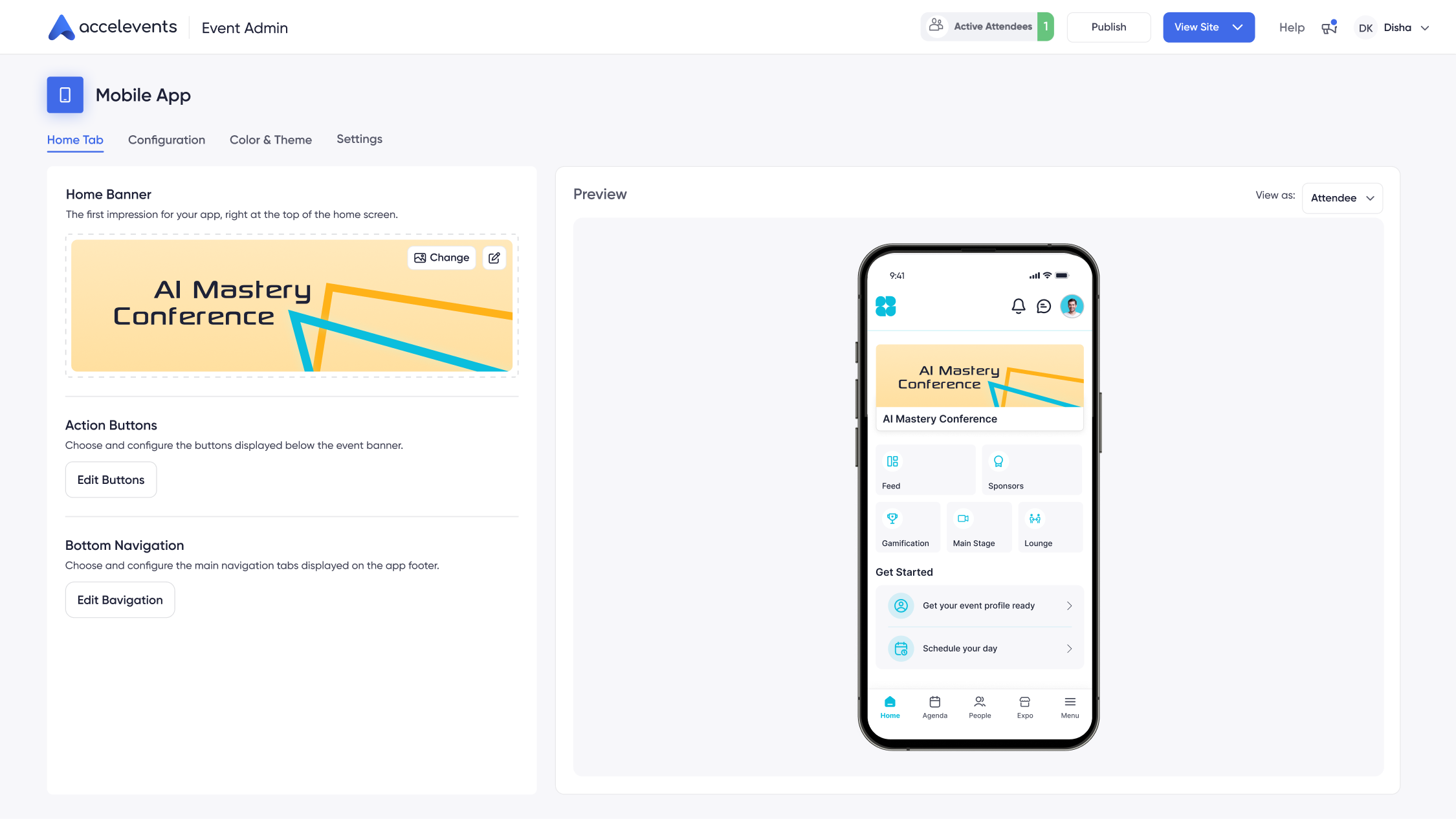
Accelevents treats the mobile app as one part of a larger platform that includes registration, onsite check in, exhibitor tools, and reporting. Organizers configure the home screen with tiles for agenda, speakers, sponsors, maps, announcements, and custom pages, so attendees can immediately find what they need. Full white-label branding lets you control icons, splash screens, colors, and navigation so the app matches your corporate or event identity instead of the vendor’s branding.
This setup is ready for agencies and internal teams that manage multiple programs with different brand requirements. Once a template is configured, it can be reused across events to shorten build times while keeping sponsor placements and navigation consistent.
Eventee
Eventee is positioned as a mobile first app focused on agendas and live participation. Organizers set up the event space, add logos and colors, and configure the navigation for sessions, speakers, and engagement tools. Branding tends to focus on visual elements like logos and themes inside the Eventee framework rather than full white-label distribution.
For teams that mainly need a branded agenda and interaction hub, this approach can work well, especially when they are comfortable managing registration and websites in separate tools.
Why this matters
Branding and app layout affect both sponsor value and attendee adoption. If attendees cannot immediately see where to go for the agenda or maps, they are less likely to rely on the app throughout the event. For groups that promise premium sponsorship visibility or strict brand standards, white label controls and reusable layouts reduce rework before each event.
- In demos, ask each vendor to build a branded home screen from scratch and show how long it takes.
- Have them switch branding to a different event or client and demonstrate template reuse.
- Request examples of white label distribution and what remains visible from the vendor brand.
2) Agenda and personalization
Accelevents
In Accelevents, the agenda is tied directly to registration and ticket types. Organizers can create multi track schedules, assign sessions by role, and control capacity rules. Changes to times, rooms, or speakers update in the mobile app within seconds without manual re-syncs. Attendees build personal schedules, receive reminders, and see updates reflected in real time as they move around the venue.
Because agenda data is shared across the platform, you can also connect it to call for papers workflows and speaker portals, so accepted sessions and speaker details flow into the mobile app without double entry.
Eventee
Eventee offers a capable agenda builder that lets organizers create sessions, add descriptions and speaker bios, and assign rooms and tracks. Attendees can browse the program, mark favorite sessions, and get a clear overview of the day. Updates to the schedule are pushed to the app so participants always have an up to date view on their phones.
Why this matters
Agenda management touches almost every attendee. When information changes, you need those changes in attendees’ hands quickly to avoid confusion at session doors. Tying the agenda to registration data also enables more accurate attendance tracking and post event reporting.
- During demos, ask vendors to change a session time and room while you watch and then show the result in the mobile app.
- Have them create personal schedules for test attendees and demonstrate notifications for overlapping sessions.
- If you run calls for speakers, ask how accepted sessions move from review to the public agenda.
3) In-app engagement and networking
Accelevents
Accelevents includes a broad engagement toolkit inside the mobile app. Organizers can enable live polls, moderated Q&A, chat, and post session surveys tied to each session. Attendees can use 1:1 messaging, meeting scheduling, and speed networking features to connect with peers and exhibitors without sharing personal contact details upfront. Gamification rules reward behaviors like attending sessions, visiting booths, or posting in discussion lounges and display leaderboards in the app.
These tools are designed for busy onsite use, so moderators can manage questions from a tablet while speakers present and attendees respond from their seats or hallway conversations.
Eventee
Eventee emphasizes interactive features for sessions, including live polling, Q&A, and social feeds where participants can post comments and photos. Attendees can react to sessions, submit questions, and engage with speakers in real time. Basic networking tools, such as profiles and messaging, help attendees connect with each other around shared interests or sessions.
Why this matters
Engagement features shape the energy of sessions and sponsor activations. The right mix of polling, Q&A, and networking encourages attendees to stay in the app, which in turn improves data quality and sponsor visibility. Networking tools also influence how your audience perceives the value of attending in person.
- Ask each vendor to run a live poll and Q&A in a test session and show the moderator view during a demo.
- Request a walkthrough of 1:1 messaging, meeting booking, and any speed networking or matchmaking capabilities.
- Have them configure a simple gamification challenge tied to booth visits and show how points display on a leaderboard.
4) Exhibitor tools and lead capture
Accelevents
Accelevents gives exhibitors their own portal and mobile tools to manage profiles, staff, and leads. Exhibitors can configure digital booths with media, resources, and meeting links, then use mobile QR scanning for lead capture at physical booths. Lead capture supports unlimited users, offline scanning, lead scoring, note taking, and integrated meeting booking, so teams do not have to share devices or rely on rented hardware.
Because exhibitors, attendees, and sessions live in the same system, lead reports include context such as sessions attended or meetings booked, which helps sponsors evaluate return on investment across the full event.
Eventee
Eventee supports exhibitor listings with profiles and sponsor visibility in the app. Attendees can browse exhibitors, mark favorites, and visit sponsored sessions. Native lead capture capabilities are more limited, so exhibitors often use separate scanners or applications when they need detailed lead qualification and team level reporting.
Why this matters
Exhibitors and sponsors expect clear lead data to justify their investment. When lead capture is part of the attendee app and shares the same data model as registration and sessions, exhibitors spend less time combining spreadsheets and more time following up on qualified opportunities.
- In demos, ask vendors to log in as an exhibitor, scan a badge, add notes and qualifiers, and then export leads.
- Have them show how many exhibitor staff can use lead capture without extra device licenses.
- Request an example of a post event sponsor report showing booth visits, leads, and session interactions together.
5) Continuing education credits and attendance tracking
Accelevents
For programs that issue continuing education, Accelevents tracks attendance at the session level and automates credit workflows. Organizers can configure rules for credit assignment, build CE programs, and automatically generate certificates. Attendees can retrieve certificates on their own, and organizers retain audit trails for compliance. Integrations with learning management systems help keep member records updated without manual entry.
Eventee
Eventee can track which sessions attendees favorite or check into and can collect feedback through surveys. For formal continuing education programs, organizers may need to combine Eventee data with separate systems or manual processes to document eligibility and produce certificates.
Why this matters
Accurate attendance and CE tracking protect your organization’s reputation and simplify compliance for regulated professions. Automating certificates also reduces staff time after the event when teams are often already planning the next program.
- Ask vendors to demonstrate session check in and show how attendance appears in reports.
- If you offer CE credits, request a full walkthrough from registration to certificate delivery for a test attendee.
6) Analytics and reporting
Accelevents
Accelevents provides real time, shareable analytics across registration, onsite, mobile, and any virtual components. Dashboards show adoption, check ins, engagement, and leads in one place so teams can make decisions during the event, like opening additional doors or promoting under attended sessions. Built on one consistent data model across registration, onsite, mobile, and virtual, creating a seamless experience for event organizers, attendees, exhibitors, and speakers.
Reports can be shared with stakeholders or exported for deeper analysis. Accelevents is known for reliability, with no references to outages in reviews, so teams can trust the data they see during critical live moments.
Eventee
Eventee tracks engagement within the app, including poll participation, Q&A activity, and session views. Organizers can see which sessions generated the most interaction and how attendees used the app during the event. When registration and lead capture live in separate tools, teams may need to combine data from multiple systems to produce consolidated reports.
Why this matters
Analytics do more than measure success after the event. Real time insight lets you respond to traffic patterns, room capacities, and sponsor performance while the event is still in progress. Unified reporting also simplifies sponsor recaps and internal debriefs.
- Ask vendors to show a live dashboard that updates as attendees check into sessions or submit questions.
- Request sample sponsor and leadership reports and confirm whether they pull data from one or multiple systems.
7) Integrations, reliability, and data flow
Accelevents
Accelevents includes native connectors to Salesforce, HubSpot, Marketo, and multiple association management systems, and there are no fees for native integrations. Public REST APIs and webhooks support custom workflows, such as syncing registrations, attendance, and leads with internal tools. Security features include custom roles, SSO, MFA, SOC 2 and ISO 27001 practices, and detailed audit logging so IT teams can align the platform with organizational policies.
No charges apply for API access, which helps teams integrate without negotiating extra contracts or modules. Data flows continuously between registration, onsite tools, and the mobile app, avoiding manual imports that can introduce errors.
Eventee
Eventee offers integrations with select CRM and marketing tools, as well as connectors for common email platforms. For more specialized systems, teams may rely on generic connectors or exports and imports. Documentation and integration options are geared toward getting engagement data into broader tech stacks rather than serving as a central system of record for registration, leads, and analytics.
Why this matters
Integrations determine whether your event data becomes a reliable asset or stays trapped in spreadsheets. When a platform connects cleanly to CRM, marketing automation, and membership systems, teams can measure long term impact without extra manual work or custom development.
- Ask vendors to outline which native CRM, marketing, and AMS integrations are included without extra fees.
- Request API documentation and an example of a webhook sending attendee activity to your systems.
8) Onsite check in, badging, and staff tools
Accelevents
Accelevents links registration, QR codes, and onsite tools so attendees can check in quickly. At the venue, staff or self service kiosks scan QR codes and print badges in seconds, and the same system updates live attendance dashboards. Staff tools support different roles, from registration teams and room monitors to exhibitors scanning leads, all working from the same attendee records.
Because check in and badge printing are integrated with the mobile app, attendees can also access their QR tickets in the app for quick scanning at doors.
Eventee
Eventee includes check in capabilities that work well for straightforward events where staff confirm attendance and scan tickets. For more complex onsite operations, teams often pair Eventee with separate registration systems or badging solutions, which can add steps to setup and require additional coordination with vendors or hardware providers.
Why this matters
Onsite operations are where attendees form their first impression of your event. A streamlined check in and badging process keeps lines short, reduces stress for staff, and ensures accurate attendance tracking from the first scan of the day.
- During demos, ask vendors to simulate morning check in for multiple attendees and show how quickly badges are issued.
- Request a view of live attendance dashboards and how they update when attendees enter or leave sessions.
9) Pricing and scalability
Accelevents
Accelevents offers transparent, scalable pricing with pay-only-for-what-you-need modules and no surprise add-ons. Organizations running multiple conferences, trade shows, fundraisers, internal meetings, and continuing education events can consolidate registration, mobile, onsite check in, and lead capture into one contract. With 1,847 customers using the platform, it serves organizations that want a single system to grow with their event portfolio across years.
Eventee
Eventee typically positions itself as accessible for smaller or more straightforward events that prioritize a mobile agenda and engagement layer. Pricing often reflects this focus, with core mobile features in scope and other capabilities, such as registration or badging, covered by different tools in the stack. As event portfolios expand, teams may add more systems alongside Eventee for areas like lead capture or deeper analytics.
Why this matters
Pricing affects more than budget. It also shapes your technology footprint when licenses are tied to separate tools for registration, mobile, and lead capture. Understanding what is included and how each platform scales with attendee numbers and event count helps you avoid hidden costs later.
- Ask vendors for clear breakdowns of what is included in base pricing versus optional modules.
- Request multi event pricing scenarios, including costs for white label branding, lead capture, and integrations.
Decision guide
Accelevents is typically a stronger fit for teams that want a single platform for event registration, mobile apps, onsite operations, and exhibitor lead capture. It bridges complex enterprise features and ease of use, delivering a balanced all in one event solution that can support enterprises, associations, and others over time. Organizations that value hands on customer success and a unified data set for analysis often prefer this approach.
Eventee can be a good fit when you primarily need a mobile first experience for agendas and live engagement and are comfortable maintaining separate systems for registration, check in, and sponsor reporting. Smaller programs or first time app users may appreciate focusing on a lighter mobile layer while other systems handle the rest of the workflow.
If your roadmap includes growing a portfolio of conferences, trade shows, fundraisers, internal meetings, and continuing education events, centralizing on a platform like Accelevents can reduce admin effort and simplify reporting. For one off or very simple meetings, pairing Eventee with existing lightweight tools may be sufficient. Consider how many stakeholders require access to data, how often you run events, and how much governance your IT and legal teams require when deciding which direction to take.
Side-by-side comparison
The table below summarizes how the Accelevents and Eventee mobile apps compare across core attendee and onsite workflows, including navigation, engagement, lead capture, and analytics. Use it as a quick reference while you watch live demos from both vendors.
Implementation checklist for live demos
- Ask each vendor to build a branded home screen, including sponsor tiles, and publish a test state of the mobile app.
- Have them create and update a multi track agenda, then show how schedule changes sync to attendee devices in real time.
- Request a live run of Q&A, polls, and post session surveys, including moderator tools and reporting views.
- Simulate onsite check in for several attendees, print badges, and display live attendance dashboards during the demo.
- Log in as an exhibitor, scan test badges, add notes and qualifiers, and then export a lead report.
- Send targeted push notifications to different attendee segments and show how recipients are selected.
- Export CSVs for registration data, session attendance, and leads, and confirm how fields align with your CRM or marketing system.
- Test offline behavior by disabling connectivity on a device and scanning a badge, then restoring the connection to confirm sync.
Migration considerations
Many teams begin with a simple mobile app or web only schedule and later move to a full platform such as Accelevents. When you plan that shift, map how ticket types, roles, and sessions will translate into mobile permissions and access. Align exhibitor objects and lead qualifiers early so sponsors receive consistent data compared with previous events.
If you are moving from Eventee to Accelevents or another all in one platform, inventory your current tools for registration, badging, lead capture, and analytics. Decide which systems will be retired, which will remain, and how historical data will move into the new platform. Pay particular attention to push notification segments, as these are critical for both safety messaging and engagement during large conferences.
Staff training is also central to a smooth migration. Room monitors, registration staff, and exhibitors should practice check in, badge printing, and lead scanning before show day. Content owners will need clear processes for preparing mobile ready descriptions, images, and resources so that sessions, speakers, and exhibitors display correctly in the app.
Frequently asked questions
How do Accelevents and Eventee compare for onsite check-in and badging workflows?
Accelevents connects registration, QR codes, check in, and badge printing in one system, updating attendance dashboards in real time. Eventee supports basic check in for straightforward events, but more complex badging operations often require additional registration or printing tools alongside the app.
Which mobile event app, Accelevents or Eventee, offers stronger exhibitor lead capture tools?
Accelevents includes built in QR lead capture with unlimited users, offline scanning, notes, qualifiers, and integrated meeting booking tied to a unified data model. Eventee offers exhibitor profiles and sponsor visibility, but exhibitors that need detailed lead capture and reporting typically rely on separate tools when using Eventee.
Can professional associations track continuing education credits using Accelevents or Eventee?
Accelevents is designed to support continuing education programs with session level attendance tracking, rule based credit assignment, automated certificates, and LMS integrations. Eventee can record session favorites, check ins, and survey data, but formal CE credit tracking generally requires combining Eventee with additional systems or manual processes.
How do Accelevents and Eventee differ in mobile app branding and white labeling?
Accelevents offers extensive branding controls and full white label options, including icons, splash screens, colors, navigation, and even app listing. Eventee focuses on in app logo and color theming within its own framework, so some vendor branding remains visible.
Which platform, Accelevents or Eventee, provides more unified analytics and reporting across events?
Accelevents delivers real time dashboards that combine registration, onsite, mobile, and virtual data in a single model, helping teams monitor adoption, engagement, and leads together. Eventee reports on in app engagement such as polls, Q&A, and session views, but organizers often need to merge this data with separate registration and lead systems for a complete picture.
Conclusion
Accelevents and Eventee both deliver capable mobile event apps, but they differ significantly in how deeply they connect to the rest of your event technology stack. Accelevents ties registration, mobile, onsite check in, lead capture, and analytics together in a single platform that is highly customizable, while Eventee focuses more on the agenda and engagement layer that can sit alongside other tools. For organizations that want one system to manage data end to end, Accelevents often aligns better with long term governance, analytics expectations, and IT standards.
Teams that run a limited number of simpler events may be comfortable keeping Eventee for agendas and live interaction while using other providers for registration and sponsorship management. Larger enterprises, associations, and others including agencies, mid-market corporations, and nonprofits frequently prefer consolidating on a platform that includes exhibitor management, continuing education credits, and security controls in one place. The Accelevents support team that responds in less than 21 seconds, 24/7 is available to assist during planning and live days, which is valuable when stakes are high onsite.
If you are evaluating which platform to use next, consider how many separate systems you want to manage, how important unified reporting is for sponsors and leadership, and how much control you need over branding and permissions. To see how these capabilities work together in real time, request a guided walk through of the mobile app, onsite tools, and reporting dashboards with your own sample agenda and data. When you are ready to explore this in depth, you can request a demo.