Choosing a mobile event app often comes down to whether you need a deeply connected part of your event tech stack or a simpler, self-contained tool. This comparison looks at how Accelevents and Expo Pass support enterprises, associations, and others including agencies, mid-market corporations, and nonprofits across planning and show day. It focuses on live workflows like check-in, navigation, engagement, and lead capture, along with data flow into sales and marketing systems. You can use this guide to compare workflows, prepare questions for vendors, and structure live demos or proofs of concept.

How to evaluate a mobile event app
A mobile event app is no longer a nice-to-have, it is the primary interface many attendees use to navigate your conference or trade show. The right app should make it easy for your team to update content, guide attendees through the venue, and collect data that proves value to stakeholders. When you compare Accelevents and Expo Pass, it helps to break the evaluation into concrete areas that you can test during a proof of concept. This is also where Accelevents can benefit enterprises and associations that want enterprise-grade capabilities without adding unnecessary complexity to staff workflows.
Key evaluation areas include:
- App creation and branding
- Agenda and personalization
- In-app engagement and feedback
- Networking and meetings
- Exhibitor tools and lead capture
- Continuing education credits
- Analytics and reporting
- Integrations, offline reliability, and data flow
- Onsite check-in, badging, and staff tools
1) App creation and branding
Accelevents
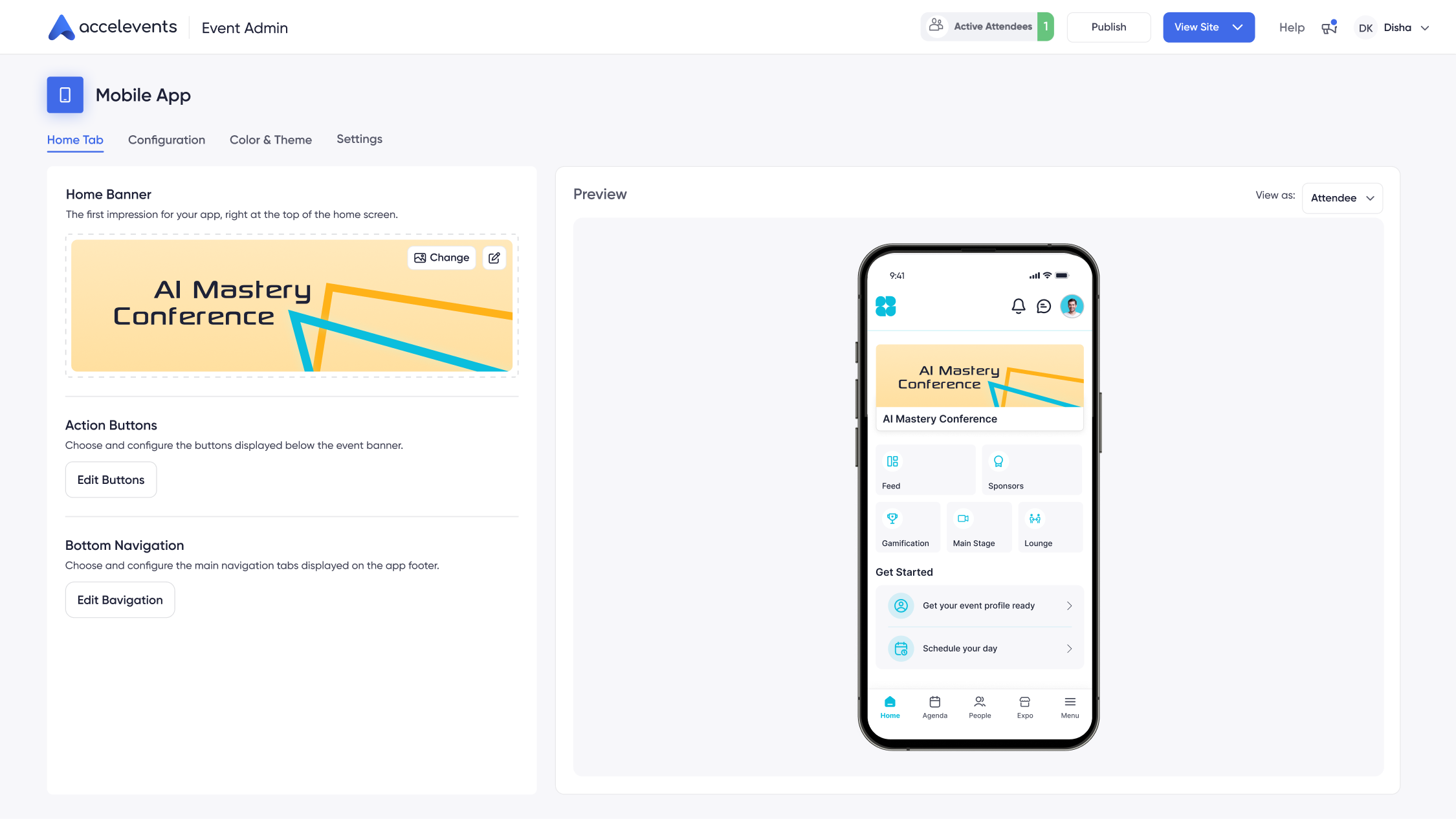
Accelevents lets teams configure a branded home screen with tiles for agenda, speakers, exhibitors, maps, and announcements, along with sponsor placements that can be sold as inventory. Colors, logos, fonts, and module visibility are all configurable so the app feels like a natural extension of your event website and signage. White label branding across web, mobile, and virtual environments gives recurring programs the option to appear under their own store listing, which is helpful for multi-year series.
The configuration experience is highly customizable while still remaining accessible for non-technical staff, so marketers and coordinators can adjust layouts and navigation as the program evolves. Content entered once in the central console flows into the app, reducing duplicate work for your team.
Expo Pass
Expo Pass provides a branded experience inside its shared mobile environment. Organizers can upload logos, define colors, and configure the primary navigation to focus on agenda, exhibitors, or maps depending on what matters most for their audience. For many one-off or smaller events, this level of branding is enough to deliver a coherent attendee experience without requiring a separate white-labeled listing.
Branding controls are oriented around template-based layouts that keep configuration straightforward. This suits teams that want to make essential visual updates but do not need to fine-tune every detail of the interface.
Why this matters
Branding affects how sponsors perceive value and how easily attendees find what they need on show day. A clear home screen reduces questions at the help desk and increases adoption of features such as maps, networking, and lead capture. White label options can also support long-term brand equity for recurring programs.
- Ask each vendor to build a branded home screen for your flagship event and publish it to a test app.
- Have them add sponsor tiles and show how quickly those placements can be updated or reordered.
- Request a walkthrough of how content from your website or CMS flows into the mobile app.
2) Agenda and personalization
Accelevents
Accelevents supports multi-track agendas with filters for tracks, rooms, tags, and levels so attendees can quickly narrow to relevant sessions. Attendees can bookmark sessions, build a personal schedule, and receive reminders before sessions begin. Changes to rooms, speakers, or times can be published to the app in seconds, which is critical when you are managing last-minute updates.
Sessions, speakers, and resources can be populated from native call for papers and abstract management workflows. Submissions, reviews, and speaker tasks all roll into the same data set that powers the agenda, helping your team keep content aligned between the website, internal spreadsheets, and the app.
Expo Pass
Expo Pass delivers a clear agenda view that works well for single or limited-track events. Attendees can browse the schedule, tap into session detail pages, and favorite sessions they plan to attend. Filters and search help people locate content by track or category, and updates are reflected in the schedule once published by your team.
For programs where the schedule is relatively stable, Expo Pass covers the core needs without requiring deep configuration. This can be a fit for events that rely on simpler programming structures and have fewer last-minute changes.
Why this matters
The agenda is often the most used part of the app, and it underpins CE tracking, room management, and sponsor exposure. If your schedule changes frequently or includes many concurrent tracks, you need to see how quickly staff can update sessions and how clearly those updates appear for attendees.
- Ask vendors to import a sample multi-track agenda and show how filtering and search work on the device.
- Request a live demonstration of updating a session time and room during the call, then refresh the app to see the change.
- Have them show how speakers and resources are managed alongside sessions and how conflicts are flagged.
3) In-app engagement and feedback
Accelevents
Accelevents includes live polling, Q&A, and chat directly inside each session, so attendees can participate without leaving the room view. Organizers can moderate questions, mark answers, and highlight selected responses on stage or in the app. Gamification tools let you create challenges tied to actions such as attending sessions, visiting booths, or completing profile fields, with leaderboards that keep engagement visible.
Session and post-event surveys can be triggered automatically based on attendance or schedule, and results flow into unified analytics. This makes it easier to compare satisfaction across tracks or days and to identify content worth repeating.
Expo Pass
Expo Pass offers polling and Q&A that presenters can use to gather quick feedback during sessions. Organizers can enable surveys to capture ratings and comments, and in-app notifications can be used to drive participation. Basic gamification rules can be set up to reward attendance or booth visits where required.
For many programs, these tools provide enough interactivity to keep audiences involved, especially when combined with strong speaker facilitation and promotion of the app in pre-event communications.
Why this matters
Engagement tools influence attendee satisfaction scores and sponsor value. They also generate data that feeds into content planning for future events. The easier it is for staff to configure questions and challenges, the more likely they are to use these tools consistently.
- Ask vendors to build a sample live poll and send it to a test device, then show how results display to organizers.
- Have them moderate Q&A in real time, including hiding and highlighting questions.
- Request a demonstration of how engagement data appears in reports broken down by session or track.
4) Networking and meetings
Accelevents
Accelevents includes 1:1 messaging, profile browsing, and optional interest tags that help attendees discover relevant peers. A built-in meeting scheduler lets participants request times, accept or decline invitations, and see confirmed meetings alongside their session schedule. Organizers can also enable recommended connections based on roles, interests, or registration data to guide networking without manual matchmaking.
Expo Pass
Expo Pass provides messaging and profile tools so attendees can search for contacts and send connection requests. Some plans support in-app meeting scheduling where participants propose times and locations, which works well for smaller groups or focused networking programs.
Why this matters
Networking outcomes are often a key success metric for sponsors and senior attendees. If the app makes it easy to find and book time with the right people, your event is more likely to be seen as a valuable use of time and budget.
- Ask each vendor to show how an attendee discovers new contacts based on interests or job title.
- Request a demo of sending and accepting a meeting request and how reminders appear on the device.
- Have them show what networking analytics are available to organizers after the event.
5) Exhibitor tools and lead capture
Accelevents
Accelevents offers a full exhibitor management portal where sponsors set up digital profiles with media, staff, resources, and meeting links. Exhibitors can use mobile QR scanning inside the app for lead capture, with unlimited users and offline support so scanning continues even if connectivity drops. Leads include notes, qualifiers, scoring, and integrated meeting booking, and they sync into real time reports where organizers and exhibitors can monitor performance.
This same structure powers digital booths where appropriate, and ROI tracking helps expo teams prove value when selling renewals. Lead capture is built into the attendee app, which simplifies training and removes the need for separate hardware or per-device licensing.
Expo Pass
Expo Pass also supports exhibitor profiles with descriptions, logos, and contact information that attendees can browse from their devices. Exhibitors can capture leads using QR code scanning and add notes or ratings to prioritize follow-up. Organizers can provide exports of captured leads for sponsors to ingest into their own systems.
For smaller shows, this model can work well, although some exhibitors may rely on manual imports or their own CRM processes to complete the workflow.
Why this matters
For trade shows and expos, lead capture quality directly influences renewal rates and sponsorship growth. Exhibitors want tools that work on their own phones and that require minimal setup on show day.
- Ask vendors to set up a sample exhibitor and scan test badges from multiple devices, including in a low-connectivity scenario.
- Request a walkthrough of how qualifiers are configured and how leads appear in organizer and exhibitor reports.
- Have them demonstrate how quickly leads can be synced or exported into a CRM for follow-up.
6) Continuing education credits
Accelevents
Accelevents supports continuing education credits with automated credit assignment rules based on session attendance and time in room. A flexible program builder maps sessions to specific credit types, and attendees can view their progress in the app and retrieve certificates on their own. Organizers benefit from audit trails and integrations to learning management systems when required, which simplifies compliance reviews.
Expo Pass
Expo Pass can record attendance and export reports that continuing education teams can use to determine credit eligibility. Depending on configuration, certificates may be generated outside the platform using exported data and internal processes.
Why this matters
For professional associations and training-focused events, CE handling is tied to member satisfaction and regulatory compliance. Automating the process reduces staff time and lowers the risk of errors when generating certificates.
- Ask each vendor to show how attendees are marked present in sessions that count toward credits.
- Request a demo of configuring a new credit type and mapping it to a set of sessions.
- Have them generate a sample certificate and explain what data is stored for audit purposes.
7) Analytics and reporting
Accelevents
Accelevents provides real time, shareable analytics across registration, onsite behavior, mobile engagement, and any virtual components you enable. Dashboards show adoption, check-ins, session attendance, leads, and engagement in one place so stakeholders can monitor performance during the event. Reports can be exported or shared as live views, which helps executives and sponsors track outcomes without waiting for post-event summaries.
Expo Pass
Expo Pass offers reporting on registrations, check-ins, and engagement within the app. Organizers can export CSV files and generate standard reports that summarize attendance and interaction for sessions and exhibitors. Some teams may supplement these reports with their own spreadsheets or BI tools.
Why this matters
Analytics help you prove ROI, refine programming, and negotiate sponsor renewals. Real time visibility also lets teams react during the event, for example by promoting under-attended sessions or highlighting sponsors that need more traffic.
- Ask vendors to show a live dashboard that combines registration, attendance, and engagement for a sample event.
- Request an export of key reports you would use for your board or executive team.
- Have them demonstrate how reports can be shared securely with sponsors or internal stakeholders.
8) Integrations, offline reliability, and data flow
Accelevents
Accelevents includes native integrations with Salesforce, HubSpot, Marketo, and multiple association management systems, with no fees for native integrations. Public REST APIs and webhooks give technical teams additional control over how data moves into other systems. Because event registration, onsite activity, and mobile engagement data all live in one platform, exports and syncs stay aligned across the lifecycle.
Built on one consistent data model across registration, onsite, mobile, and virtual, creating a seamless experience for event organizers, attendees, exhibitors, and speakers. The platform is known for reliability, and offline behavior is designed so cached agendas, tickets, and lead capture continue working when venue connectivity is limited, then sync when devices reconnect. Security features such as custom roles, SSO, MFA, SOC 2 and ISO 27001 practices, and detailed audit logging align with enterprise requirements.
Expo Pass
Expo Pass connects to other systems primarily through exports and selected integrations, which can be suitable for teams with simpler stacks or lighter automation requirements. Offline support covers core attendee experiences such as viewing the agenda and exhibitor lists, with data syncing back when the connection is restored.
For organizations that already rely on internal tools for analytics or CRM, this approach can fit into existing manual or semi-automated workflows, provided the data model is mapped carefully.
Why this matters
Integrations and reliability determine how easily your event program plugs into the rest of the business. For corporate marketing and IT teams, the presence of modern APIs, security controls, and clear data ownership can be as important as front-end features.
- Ask vendors to walk through their integration catalog and show a real connection to Salesforce or your CRM of choice.
- Request a demonstration of REST API documentation and example webhooks for key events such as registration or check-in.
- Have them explain offline behavior and run a quick test where a device is taken off Wi-Fi, used for scanning, then reconnected.
9) Onsite check-in, badging, and staff tools
Accelevents
Accelevents supports onsite check-in with QR-based scanning, mobile devices, and badge printing options that can be configured for self-serve kiosks or staffed desks. Staff can see live counts of arrivals by ticket type or session, and can redirect attendees based on capacity. The same admin environment used for the app controls check-in devices, which simplifies staff training.
Badges can be designed with drag-and-drop tools, and unlimited ticket types and discount codes are available for pre-event setup. Group ticket bundles and conditional form logic help registration teams capture the right data by attendee type while keeping the check-in experience fast.
Expo Pass
Expo Pass provides onsite check-in and badge printing using supported hardware and mobile devices. Staff can scan confirmation codes, print badges, and monitor arrivals, which serves the needs of many small to mid-sized conferences and expos.
For programs that do not require complex ticket structures or on-the-fly configuration changes, this setup delivers a predictable front-of-house experience.
Why this matters
Onsite operations shape the first impression attendees and sponsors have of your event. A smooth check-in flow reduces lines and support requests and frees staff to focus on higher value activities like sponsor care and VIP management.
- Ask each vendor to simulate peak-time check-in with multiple devices scanning and printing badges simultaneously.
- Request a demonstration of editing a badge layout and publishing the change to printers.
- Have them show real time dashboards for arrivals by ticket type and any alerts for capacity thresholds.
Decision guide
Accelevents typically fits organizations that want an all-in-one platform spanning registration, onsite, mobile, lead capture, analytics, and integrations in a single environment. With 1,847 customers and organizations of all sizes using it for conferences, trade shows, fundraisers, internal meetings, and continuing education events, the platform appeals to teams that want to grow an event program over time. Transparent, scalable pricing with pay-only-for-what-you-need modules and no surprise add-ons makes it easier to align costs to different event formats across a portfolio.
Expo Pass can be a solid choice when you need a contained mobile and onsite solution for small to mid-sized events and do not require deep automation with CRM or marketing systems. Teams that prefer simpler licensing and are comfortable with exports or light integrations can find the Expo Pass model straightforward to operate, especially when internal governance favors lean tech stacks.
In environments with strict data models, complex integration requirements, or strong executive expectations for analytics, Accelevents often reduces admin burden compared to stitching together point tools. Where budgets, governance, or staffing levels favor a simpler implementation and lighter training needs, Expo Pass may align better as long as stakeholders understand any trade-offs around data flow and automation.
Side-by-side comparison
The table below summarizes how the mobile apps compare across core attendee and exhibitor workflows, from navigation and engagement to lead capture, analytics, and integrations. Use it alongside your own requirements to identify areas to test during demos.
Implementation checklist for live demos
- Build a branded home screen for a sample event and publish a test state to devices for both platforms.
- Create and update a multi-track agenda, then show how quickly changes sync to attendee schedules.
- Launch live polls and Q&A in a test session and display how results and questions appear to staff.
- Scan badges as an exhibitor on multiple devices, including an offline test, then review lead reports.
- Check in and badge-print test attendees at different entry points, then show live attendance dashboards.
- Schedule and accept 1:1 meetings, demonstrating how alerts and calendar reminders are delivered.
- Export CSVs for registration, session attendance, and leads, confirming field alignment with your CRM or MAP.
- Walk through integration configuration for at least one CRM connection, including testing a sample sync.
Migration considerations
If you are moving from a simpler or web-only setup, start by mapping how registration data, sessions, and exhibitors will populate the mobile app. In Accelevents, the same objects power registration forms, agendas, exhibitor management, and mobile content, which reduces duplicate entry and keeps naming consistent. For Expo Pass, you may need to plan imports and updates separately to match your existing workflows.
When migrating between platforms, align data models so ticket types, roles, exhibitors, and lead qualifiers map cleanly from old to new. Test how existing integrations or exports will be replaced, especially if your current stack relies heavily on CRM or marketing automation. Plan push notification segments in advance and run offline tests at your venue or a similar environment to validate scanning and caching before going onsite.
Finally, consider staff training and content preparation timelines. Teams adopting Accelevents can centralize training around a single console for registration, mobile, exhibitors, CE, and analytics, supported by customer success resources and a support team that responds in less than 21 seconds, 24/7. With Expo Pass, focus training on core mobile and onsite workflows and define clear responsibilities for any manual exports or imports that support downstream systems.
FAQs
How do Accelevents and Expo Pass compare for mobile event app branding control?
Accelevents provides more granular branding options, including configurable tiles, colors, fonts, and an optional white label app listing. Expo Pass focuses on branding within a shared container app, allowing logos, colors, and navigation emphasis to be customized for each event. Teams that need a fully standalone branded presence typically look at Accelevents, while those satisfied with event-level branding may find Expo Pass adequate.
Which platform is better for exhibitor lead capture, Accelevents or Expo Pass?
Accelevents offers exhibitor lead capture built directly into the attendee app, with unlimited users, offline QR scanning, qualifiers, scoring, and integrated meeting booking. Expo Pass supports QR-based lead capture with notes and ratings, with organizers providing exports for sponsors to use in their own systems. For shows that emphasize detailed ROI tracking and real time lead visibility for both organizers and exhibitors, Accelevents provides a more comprehensive workflow based on the capabilities described.
Can Accelevents manage complex multi-track conference agendas more effectively than Expo Pass?
Accelevents is designed to handle multi-track agendas with filters for tracks, rooms, tags, and levels, plus rapid updates that sync to attendee schedules. Expo Pass supports clear agendas and filtering but is positioned for single or limited-track programs where the schedule is relatively stable. Organizations running content-heavy conferences with frequent changes will typically find Accelevents better aligned with those operational demands based on the features outlined.
How do Accelevents integrations and data flow differ from Expo Pass for enterprises?
Accelevents includes native integrations with systems like Salesforce, HubSpot, Marketo, and association platforms, plus REST APIs and webhooks built on a single data model across registration, onsite, mobile, and virtual. Expo Pass connects primarily through exports and selected integrations, which can work for simpler stacks or more manual processes. Enterprises that rely on automation and unified reporting often evaluate Accelevents for its integrated data flow, while lighter requirements may make Expo Pass sufficient.
How do Accelevents and Expo Pass handle continuing education credits for attendees?
Accelevents supports CE credits with automated rules based on attendance and time in room, a flexible credit program builder, in-app progress views, and self-service certificate retrieval. Expo Pass records attendance and provides exports that CE teams can use to determine eligibility, with certificates potentially generated outside the platform. Associations and training-focused events that want more automation and audit trails may lean toward Accelevents, while those comfortable with external CE processes may use Expo Pass alongside internal tools.
Conclusion
Accelevents and Expo Pass both deliver mobile apps that help attendees navigate events, engage with content, and connect with exhibitors. The key difference is that Accelevents bridges complex enterprise features and ease of use, delivering a balanced all-in-one event solution that unifies registration, onsite operations, mobile engagement, and analytics, while Expo Pass emphasizes a contained toolset that suits smaller or less integrated environments.
Teams running portfolios of in-person, virtual, and hybrid events or those with strong integration and analytics expectations often gravitate toward Accelevents because it keeps data flowing across systems without heavy custom work. Organizations with simpler requirements, limited integration needs, or a preference for lighter configurations may find Expo Pass meets their needs, provided they are comfortable managing more processes with exports and internal tools.
Built on one platform that ties together registration and ticketing, lead capture, call for papers, exhibitor management, continuing education credits, white label branding, security, and real time analytics, Accelevents gives growing programs a foundation that scales as portfolios expand and requirements evolve. To see how the mobile app, lead capture, onsite check-in, and analytics can work together for your next conference or trade show, request a demo.