Choosing a mobile event app is really about choosing how you want attendees, exhibitors, and staff to experience your event on show day. Accelevents includes a mobile app as part of a complete event management platform that covers registration, check-in, badge printing, and analytics, while Grip centers its experience on AI-powered networking and attendee matchmaking. This article compares how each platform handles core mobile workflows that matter for enterprises, associations, and others including agencies, mid-market corporations, and nonprofits. You can use it to evaluate features, understand live-day workflows, and prepare focused demos or proofs of concept with each vendor.

How to evaluate a mobile event app
A good mobile event app should feel like a natural extension of your overall event program, not a separate tool that staff and attendees have to wrestle with. When you compare options, look beyond basic features and focus on how the app fits into registration, onsite operations, exhibitor ROI, and post-event reporting. It is also important to understand how data flows between the app, your CRM or AMS, and your marketing tools. Finally, consider how much training and setup time each platform requires so your team can deliver a great experience without adding unnecessary complexity.
Key evaluation areas to consider include:
- App creation and branding
- Agenda and personalization
- Attendee networking and meetings
- Onsite check-in, badging, and staff tools
- Exhibitor tools and lead capture
- Continuing education credits and session tracking
- Analytics and reporting
- Integrations, CRM, and data flow
- Pricing, value, and fit by event type
Built on one consistent data model across registration, onsite, mobile, and virtual, creating a seamless experience for event organizers, attendees, exhibitors, and speakers.
1) App creation and branding
Accelevents
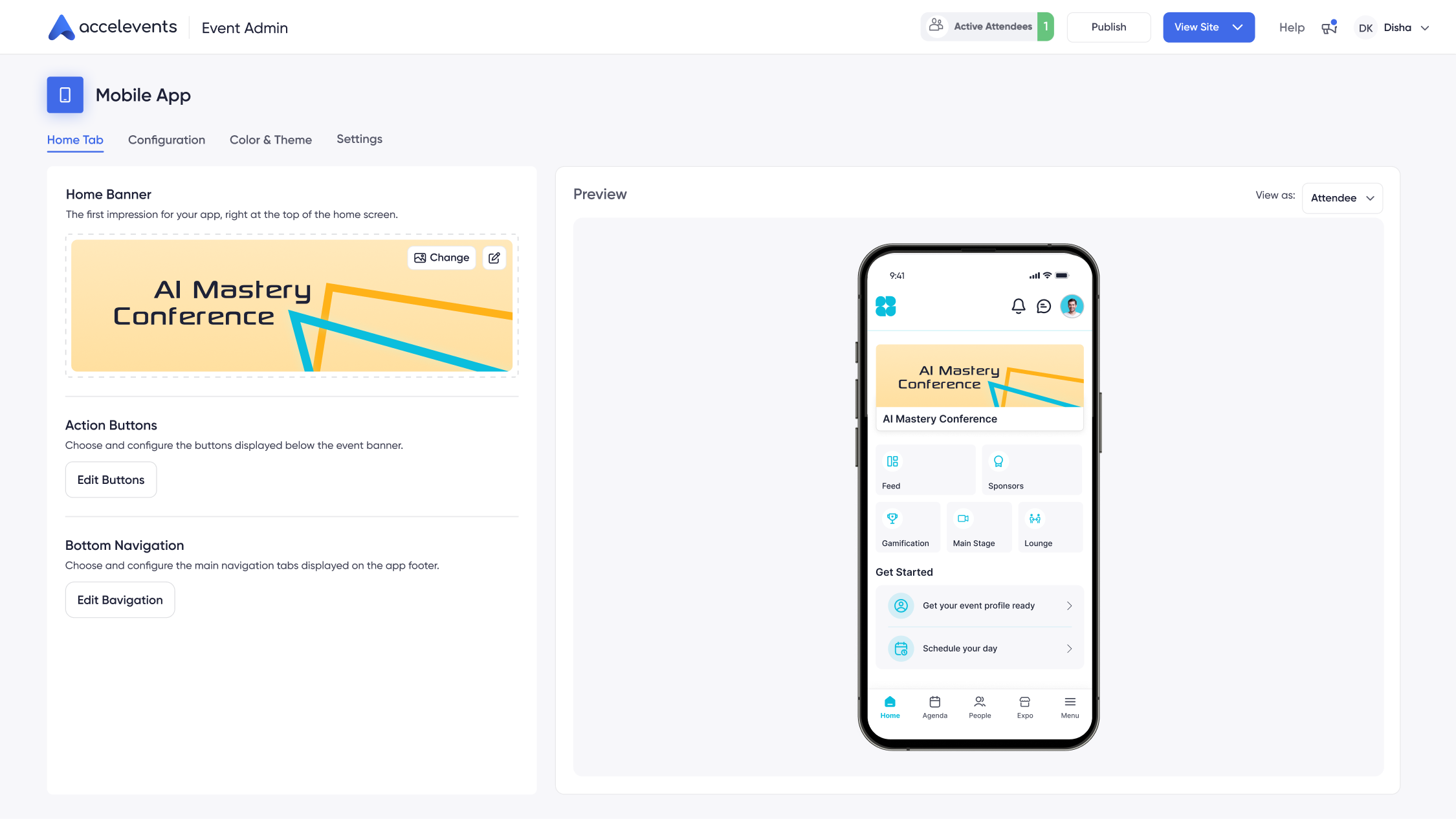
Accelevents treats the mobile app as a branded extension of your event. Organizers configure colors, logos, iconography, and navigation so the app matches existing design systems. White label branding is available, which lets you remove platform branding and present a fully branded experience across web, mobile, and virtual environments with customizable themes. With 1,847 customers, Accelevents is often chosen by teams that want a highly customizable mobile hub that aligns with their broader marketing and design standards.
Grip
Grip offers standard branding options so you can apply your logo and core event colors to the attendee app. Navigation focuses heavily on networking, recommendations, and meetings, so the primary branded surfaces are the home view, profile areas, and sponsor placements. For organizations that prioritize AI-driven networking above other elements of the experience, this branding model can be sufficient, especially when the main goal is to get attendees quickly into the matchmaking workflows.
Why this matters
Brand consistency influences how attendees perceive the professionalism of your event and how easily they recognize sponsor placements or key calls to action. A configurable home screen and navigation structure also affect how quickly people can find agendas, maps, and meeting tools onsite. When you run demos, ask each vendor to:
- Build a branded home screen that reflects your color palette, logo, and navigation priorities.
- Show how to hide or reveal modules for different events or attendee types.
- Demonstrate white label options, including app icons and store listings if available.
- Update branding elements live and show how quickly the changes appear on test devices.
2) Agenda and personalization
Accelevents
In Accelevents, the agenda ties directly to registration records, ticket types, and session capacities. Attendees browse multi-track schedules, filter by track or topic, and add sessions to a personal schedule. Organizers can synchronize sessions with external calendars, send reminders for upcoming sessions, and update times or rooms with live changes reflected in the app. Because agenda data lives in the same system as registration and onsite check-in, staff do not have to manage multiple lists or imports.
Grip
Grip also supports session listings and personal schedules, along with recommendations that surface sessions based on attendee interests and who else might attend. This can help drive discovery of less obvious sessions. However, Grip often relies on a separate registration or content management system for the master session list, so updates may require coordination across tools and connectors.
Why this matters
Attendees depend on a clean, current agenda to plan each day, and organizers need accurate attendance data for room management and speaker reporting. Connecting agenda data to registration and onsite tools reduces the risk of conflicting information across systems. In a live demo, ask vendors to:
- Create a multi-track agenda and show how filters and search work on the attendee device.
- Update a session time, room, or speaker and demonstrate how quickly changes sync to the app.
- Show how personal schedules appear to attendees and how reminders are configured.
- Explain how agenda data is stored and updated when you have last minute changes onsite.
3) Attendee networking and meetings
Accelevents
Accelevents includes attendee directories, profile fields, interest tags, and filters that let people find peers, sponsors, and speakers quickly. Attendees can send connection requests, exchange virtual business cards via QR codes, and book one to one meetings in designated networking areas. Organizers can configure meeting rules and timeslots, then track how many meetings are scheduled for sponsors or key stakeholders. Messaging tools support conversations before, during, and after the event with moderation controls when required.
Grip
Grip is built around AI-powered matchmaking that analyzes profiles, job titles, interests, and goals to recommend people to meet. Attendees receive ranked suggestions and can accept, skip, or message directly, and the platform can automate meeting slot suggestions based on mutual availability. This focus on AI-driven discovery makes Grip a strong choice when your primary objective is to maximize high quality meetings among buyers, sellers, and partners.
Why this matters
Networking is often a core reason attendees travel to an event, and sponsors measure success by meetings and qualified conversations. You need to understand whether your program requires a highly guided matchmaking model, open discovery tools, or a mix. During demos, ask vendors to:
- Walk through how attendees set preferences and how recommendations or filters are applied.
- Book test meetings between sample profiles and show calendar handling and notifications.
- Demonstrate virtual business card exchange or QR-based contact sharing.
- Show how organizers can monitor networking engagement and intervene if needed.
4) Onsite check-in, badging, and staff tools
Accelevents
Accelevents was originally built for in-person events and includes native onsite check-in and badge printing tightly connected to registration data. Each attendee receives a unique QR code that staff can scan at entry points, session doors, or kiosks. Self-service check-in lets attendees scan their code from the app or confirmation email, then print a badge in seconds without staff assistance. Staff apps manage real time arrivals, capacity at rooms, and walk-in registrations, all using the same data set.
Grip
Grip focuses on networking rather than onsite operations, so organizers usually pair it with external systems for primary check-in and badging. QR codes used for Grip profiles or meetings are often separate from the codes used by registration providers at entry points. This separation can work, but it adds coordination requirements between Grip and whichever provider handles doors and printers.
Why this matters
The arrival experience shapes first impressions, and long lines or badge errors can frustrate attendees and VIPs. An integrated approach to check-in and badging can also reduce hardware rentals, imports, and last minute data clean up. When evaluating options, ask vendors to:
- Simulate onsite check-in with both staffed and self-service workflows.
- Scan sample QR codes and print badges from different devices and printer models.
- Show how walk-in registrations or name changes update badges and session access in real time.
- Explain which onsite tasks are native to the platform and which require partners or add ons.
5) Exhibitor tools and lead capture
Accelevents
Accelevents includes exhibitor management and lead capture within the same platform used for registration and the mobile app. Exhibitors receive a portal for managing digital booths, staff, and meetings, and onsite staff can scan attendee QR codes from the mobile app to capture leads with unlimited users and offline support. Exhibitors configure custom qualification questions, add notes, and score leads, then view real time reports and book follow up meetings directly from captured records.
Grip
Grip offers exhibitor and sponsor profiles, meeting scheduling, and lead capture features that tie into its networking flows. Exhibitors can review suggested matches, send meeting requests, and log outcomes. Lead data may be exported or integrated with external systems depending on configuration. However, because registration and primary badge scanning usually sit in separate tools, exhibitors might have to reconcile contact lists from multiple sources after the event.
Why this matters
Sponsorship renewal often depends on how easily exhibitors can capture and act on leads, and on how clearly you can prove ROI. Having lead capture inside the core event platform reduces manual exports and per-device licensing fees. In demos, ask each provider to:
- Scan test badges from multiple devices, including offline scenarios, and show how data syncs later.
- Configure custom qualification questions and demonstrate how those appear to booth staff.
- Export leads in CSV format and push a sample set into a CRM environment.
- Show sponsor reporting, including meetings held, leads captured, and engagement over time.
6) Continuing education credits and session tracking
Accelevents
For training-heavy programs and professional development events, Accelevents supports continuing education credits with automated rules tied to authenticated session attendance. The platform can assign credits when attendees meet time thresholds at specific sessions, generate certificates instantly, and provide self-service retrieval links. Organizers use a flexible program builder to define credit types and maintain audit trails, and integrations with learning systems help keep long term records aligned.
Grip
Grip can track attendance and engagement related to networking activities and sessions, but it is less focused on credit issuance workflows. Any CE program typically depends on a separate learning or association platform to maintain program rules and certificates, with Grip contributing attendance data where configured. This can work well when networking is the primary role of the app and CE is managed elsewhere.
Why this matters
Programs that rely on CE credits face strict requirements for documentation, time tracking, and audit readiness, especially for regulated industries. Handling attendance and credits inside your core event platform can simplify compliance reporting and reduce manual reconciliation. When you test vendors, ask them to:
- Check attendees into sessions and show how attendance records appear in admin reports.
- Configure a sample credit program with rules and thresholds, then generate a certificate.
- Demonstrate how attendees access their credits or certificates after the event.
- Explain how credit and attendance data can be shared with external systems.
7) Analytics and reporting
Accelevents
Accelevents provides real time, shareable analytics across registration, onsite check-in, mobile usage, and virtual participation when applicable. Dashboards show session attendance, check in rates, exhibitor lead volume, and engagement with app features, all driven by the same underlying data model. Organizers can export detailed reports or share live dashboards with executives and sponsors, without needing separate reporting modules for each event component.
Grip
Grip offers detailed analytics on networking activity, including profile views, matches, meetings scheduled, and messaging volume. Organizers can identify which segments are most active and where to adjust engagement tactics. For full event analytics that cover check-in, tickets, or CE tracking, teams usually combine Grip data with reports from other systems, which may involve manual work or separate data pipelines.
Why this matters
Clear reporting helps stakeholders understand what worked and where to invest next year, and it is crucial for sponsors and internal leadership. Real time dashboards are especially important when you need to manage room capacities, reassign staff, or troubleshoot low engagement while the event is live. In demos, ask vendors to:
- Show end to end dashboards that cover registrations, check-ins, session attendance, and app usage.
- Drill from high level views into individual attendee or exhibitor records where permissions allow.
- Export sample CSVs for registrations, attendance, and leads, and review the available fields.
- Explain how analytics from multiple modules are combined and whether reports are easily shareable.
8) Integrations, CRM, and data flow
Accelevents
Accelevents includes native integrations to Salesforce, HubSpot, Marketo, and multiple association management systems with no additional fees for these connectors. Registration and lead capture data can sync automatically into CRM and marketing tools, and public REST APIs plus webhooks support custom integrations. Security features such as custom roles, SSO, MFA, SOC 2 and ISO 27001 practices, and detailed audit logging help larger organizations align the platform with internal governance policies.
Grip
Grip connects with a range of registration providers, CRMs, and other event technology tools, often through APIs or integration partners. This approach can work well when Grip is one component in a broader event technology stack, but it increases the importance of clear mapping and testing across multiple systems. Organizations may need dedicated technical resources to design, monitor, and maintain the data flows between Grip and their registration or marketing tools.
Why this matters
Integration quality determines how much manual work your team has to do before and after each event. Clean data flows reduce duplicate records, simplify sponsor reporting, and speed up follow up campaigns. When evaluating platforms, ask each vendor to:
- Walk through native CRM and marketing integrations and show configuration screens.
- Trigger a test registration or lead capture and follow it from the app into your CRM.
- Explain available APIs and webhooks and share example payloads or documentation.
- Describe how authentication, roles, and audit logs are managed for admins and staff.
9) Pricing, value, and fit by event type
Accelevents
Accelevents uses transparent, scalable pricing where you pay for the modules you actually need, with no surprise add ons for core functions like integrations. Because registration, onsite tools, mobile app, and exhibitor lead capture all live in the same platform, many organizations can consolidate several legacy tools into one contract. The platform fits conferences, trade shows, fundraisers, internal meetings, and continuing education events and is often adopted by organizations that want to grow usage over time without switching systems.
Grip
Grip pricing usually reflects attendee volume and the depth of AI networking features you activate. For events where curated meetings and matchmaking are the central value proposition, this can deliver strong returns, especially for buyer seller programs. However, you may still need to budget separately for registration systems, onsite check-in, and badge printing, which can make the overall technology stack more complex and harder to predict financially.
Why this matters
Decisions about mobile event apps involve more than license fees, they affect staff time, training, and the number of vendors you manage. A platform that consolidates key workflows may reduce overall cost of ownership, even if its line item price is similar to more focused tools. In conversations with vendors, ask them to:
- Provide pricing examples for your expected attendee counts and event mix.
- Clarify which features, integrations, or support tiers incur additional charges.
- Estimate ramp up timelines for your first event and for a full calendar of events.
- Describe how pricing scales if you add more events, exhibitors, or staff over time.
Decision guide
Accelevents is typically a better fit when you want a single platform to manage event registration, onsite check-in and badge printing, the mobile app, exhibitor tools, and analytics in one place. Teams that value consolidated data, native CE credit workflows, and integrated lead capture often appreciate reducing their stack to one vendor. Accelevents is known for reliability with no references to outages in reviews, and many programs benefit from having one primary system to standardize processes across multiple events.
Grip can be preferred when your top priority is AI-powered networking at scale and you already have established registration and onsite systems you plan to keep. Enterprises that run highly targeted matchmaking programs or sponsored meetings sometimes choose Grip as a specialized networking layer in a broader technology ecosystem. The trade off is that staff must coordinate data and governance across more tools, which can introduce additional training and support requirements.
Organizations of all sizes, including large enterprises, mid-market corporations, associations, agencies, and nonprofits, often evaluate how much time their teams can dedicate to managing integrations and imports versus configuring one connected platform. If your internal technology group has capacity to manage multiple providers, a specialized networking solution like Grip may fit into that model. If you prefer to centralize tooling, Accelevents helps reduce admin burden while still supporting deep configuration and strong customer success partnerships.
Side-by-side comparison
The table below summarizes how the core mobile experiences differ across key functional areas, with a focus on what attendees, exhibitors, and staff actually use onsite. You can use it as a
quick reference before deeper demos with each vendor.
Implementation checklist for live demos
To move beyond slideware, ask each vendor to complete specific tasks during a live demo or proof of concept so you can see how the platforms behave under real conditions.
- Build a branded home screen, apply your logo and colors, and publish a test state to sample devices.
- Create a multi track agenda, then change a session time and room and show how updates sync to the app.
- Configure networking preferences, then walk through AI recommendations or filtered discovery for two sample attendees.
- Check in and badge print test attendees from both staffed and self service flows, showing live attendance dashboards.
- Scan badges as an exhibitor from multiple devices, including offline tests, then review lead reports and exports.
- Set up a basic CE credit program, check attendees into sessions, and generate certificates for a subset of participants.
- Send targeted push notifications to specific segments and demonstrate how recipients are selected.
- Trigger CRM and marketing syncs from registrations and captured leads, then verify data accuracy in downstream systems.
Migration considerations
Many teams move to Accelevents or Grip from simpler web only tools or from a mix of point solutions. The first step is usually to map your existing ticket types, registration forms, and session structures into the new platform. For Accelevents, this includes connecting badge designs, QR codes, and onsite check in logic to your ticket model so the mobile app, kiosks, and staff devices all pull from the same records.
If you are switching from Grip or another networking focused app to an all in one platform, consider how you will migrate historical data, such as meeting history and networking preferences, and how much of that you truly need going forward. For organizations layering Grip into an existing stack, make sure responsibilities for data ownership, integrations, and downstream reporting are clear between tools and teams.
Regardless of direction, plan time to test push notifications, QR code scanning, offline behavior, and CE credit rules before you go onsite. Train staff on mobile admin views, check in flows, and exhibitor support, and ensure your content owners are ready to maintain agendas, maps, and sponsor placements directly in the app. A thoughtful migration plan keeps surprises to a minimum and helps your support team that responds in less than 21 seconds, 24/7 stay focused on true exceptions rather than predictable issues.
Conclusion
Accelevents and Grip take different approaches to mobile event experiences. Accelevents delivers an all in one platform that connects registration, onsite operations, mobile engagement, exhibitor tools, CE credits, integrations, and analytics through a single data model. Grip concentrates on AI-powered networking, helping attendees find high value connections and schedule meetings, while typically relying on other systems for registration, check in, and some reporting needs.
Teams that want to streamline vendors, standardize workflows across multiple events, and rely on strong customer success may lean toward Accelevents as their primary system of record. Organizations that already have established registration and onsite stacks, and that view networking as a standalone priority, may decide to add Grip as a specialized layer for certain programs. In both cases, aligning your choice with data model design, admin workload, exhibitor licensing expectations, onsite operations, and analytics requirements will help you get long term value from whichever platform you select.
FAQs
How do Accelevents and Grip compare as mobile event apps for conferences and trade shows?
Accelevents is designed as an all-in-one platform that connects registration, onsite check-in, badging, mobile engagement, exhibitors, and analytics through a single data model. Grip focuses more narrowly on AI-powered networking and attendee matchmaking and typically relies on separate systems for registration and onsite operations. For conferences and trade shows that want fewer tools and unified data, Accelevents emphasizes consolidation, while Grip is better suited as a specialized networking layer in a broader stack.
Which mobile event platform is better for onsite check-in and badge printing, Accelevents or Grip?
Accelevents includes native onsite check-in and badge printing that are directly tied to registration data and attendee QR codes. Grip usually depends on external providers to handle primary check-in, badging, and access control, with separate QR codes for its networking features. If integrated onsite operations and minimizing coordination across multiple vendors are priorities, Accelevents is more focused on that workflow.
Can exhibitors capture and manage leads effectively with Accelevents compared to Grip’s networking-focused tools?
Accelevents offers built-in exhibitor management and lead capture inside the same platform as registration and the mobile app, with QR scanning, custom qualifiers, notes, scoring, and real-time reporting. Grip also supports exhibitor profiles, meeting scheduling, and lead capture tied to its networking flows, with export or integration options depending on setup. Exhibitors using Grip may need to reconcile leads from separate registration and scanning systems, while Accelevents aims to keep exhibitor lead data in one place.
How do Accelevents and Grip handle continuing education credits and session attendance tracking?
Accelevents supports full CE credit workflows, including authenticated attendance tracking, rule-based credit assignment, instant certificate generation, and audit-ready records that can integrate with learning systems. Grip can collect attendance and engagement data related to sessions but generally relies on external platforms to manage CE rules and certificate issuance. For programs where CE tracking is central and must live inside the event platform, Accelevents provides more native functionality.
How do Accelevents and Grip differ in CRM integrations and overall event data flow?
Accelevents provides native integrations to major CRMs and marketing tools, with automatic syncing of registration and lead capture data and one underlying data model across registration, onsite, mobile, and leads. Grip connects to registration systems, CRMs, and other tools via APIs and partners, which can be effective but often requires more technical design and monitoring of data flows. Organizations looking to reduce manual work and connector complexity may find Accelevents’ integrated approach better aligned with that goal.
To see how a unified platform can support your next conference or trade show from registration through CE credits and lead capture, request a demo at request a demo.