

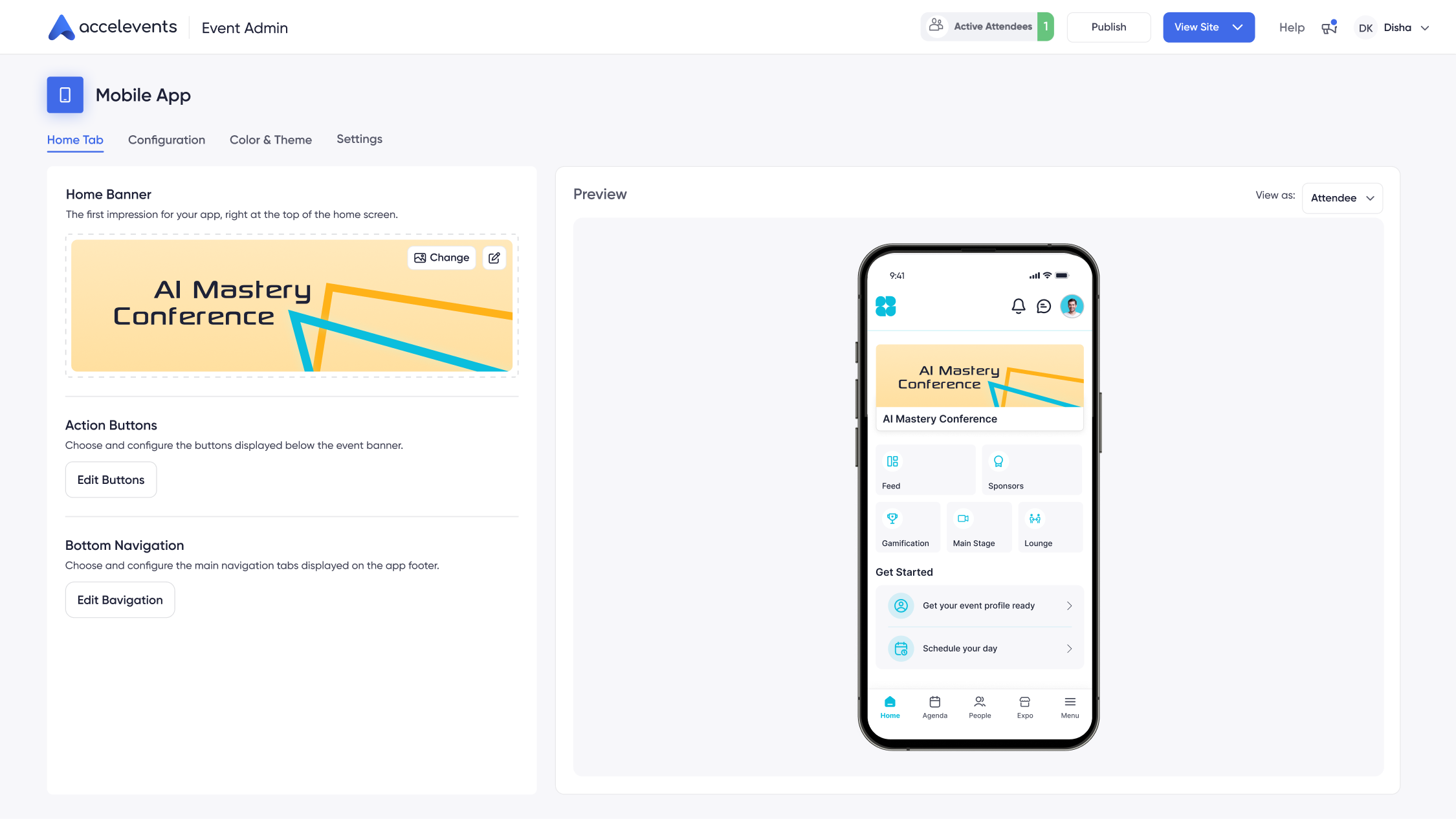
Short answer: Several event management systems provide a mobile event app for attendees in 2026, including Accelevents, Cvent, Bizzabo, Whova, Stova, vFairs, Swoogo, Eventee, Eventleaf, Eventtia (formerly Aventri), and Momentive Software. They differ mainly in how deeply the app connects to registration, check-in, exhibitor lead capture, and CRM data on the same platform.
If your team wants an attendee app that shares one data model with registration, check-in, and reporting instead of syncing between tools. Accelevents' attendee engagement platform includes a mobile event app built on the same system that runs your tickets, sessions, and CRM integrations. Below is a plain-language breakdown of which platforms offer mobile event apps in 2026, what each is known for, and the specific checks to run in a demo before you commit.

What a mobile event app for attendees actually does
A mobile event app for attendees is an iOS and Android experience that carries an attendee through the event, from pre-event agenda planning to on-site check-in, networking, sessions, sponsors, and post-event follow-up. The strongest attendee apps in 2026 handle:
- Personal agendas with reminders and push notifications
- Interactive floor plans, venue maps, and wayfinding
- In-app networking, messaging, and meeting booking
- Live polls, Q&A, and session feedback
- Sponsor and exhibitor discovery with lead capture on the same device
- Continuing education (CE) tracking and certificate delivery
- Live analytics that flow back to organizers and CRM
The category divides roughly into three types: native attendee apps built into a full event platform (Accelevents, Cvent, Bizzabo, Whova, Stova, vFairs, Momentive), app-first vendors where the mobile experience is the core product (Eventee, Eventleaf), and registration-first platforms with an attendee app via partnership or add-on (Swoogo).
Comparison table: mobile event apps in 2026
Vendor capabilities change. Confirm current scope, pricing tier, and white-label depth directly with each vendor before shortlisting.
Platform-by-platform notes
Accelevents
Accelevents was intentionally built on one consistent data model across registration, onsite, mobile, and virtual, so attendee, exhibitor, sponsor, and speaker data stays in sync as the event runs. The attendee app includes personal schedules, notifications, interactive maps, in-app meetings, exhibitor lead capture, and sponsor placements — all powered by the same system that runs tickets and check-in. That "one system" approach speeds testing, approvals, and reporting for enterprises and associations. See Accelevents' attendee engagement page or the white-label options.
Cvent

Cvent supports a branded attendee app as part of a large ecosystem that also includes venue sourcing. The company has grown largely through acquisition and certification courses are commonly needed for power users, so plan for training and internal process alignment. In demos, confirm which mobile capabilities are on your specific tier and how modules connect end-to-end. See Accelevents App vs. Cvent App for a direct comparison.
Bizzabo

Bizzabo positions its attendee app around engagement and offers wearables integrations for on-site data collection. When evaluating, verify how ticketing rules mirror your policies and confirm exactly what reporting is available to share externally without manual exports.
Whova

Whova is a common choice when the attendee-networking layer is the priority. Verify white-label depth (some app-shell branding may be limited on lower tiers), and confirm how attendee data flows back into your CRM and reporting stack.
Stova

Stova offers end-to-end tooling and mobile app options for multi-event teams, following consolidation across previously separate products. In demos, ask how branding and data ownership are handled across modules and how analytics are shared with executives.
vFairs

vFairs provides an attendee app inside a broader virtual and in-person event platform. Clarify white-label scope for the app shell versus the app icon, and confirm the reports you need are shareable without CSV exports.
Swoogo

Swoogo is registration-first with a marketplace of connectors, and pairs with a mobile app partner for the attendee experience. Validate group registration behavior and confirm mobile-side analytics roll up alongside your registration dashboards.
Eventee

Eventee is an app-first vendor focused on the attendee experience, with a brandable interface for agendas, networking, and engagement features. Confirm how data syncs with your registration system and how exhibitor and sponsor workflows are handled outside the app.
Eventleaf

Eventleaf pairs event management with an attendee guide app that includes session scheduling, networking, and interactive polls and surveys. Confirm how it handles complex registration rules, member pricing, and CRM sync for your use case.
Eventtia (formerly Aventri)

Eventtia is a SaaS event platform with on-site and mobile capabilities, including real-time attendance data tracking and engagement tools. Verify how attendee-level engagement data is exported and how offline scanning is handled at scale.
Momentive Software

Momentive Software (formed after several association-tech acquisitions) offers mobile applications tied to association management workflows, spanning registration to post-event engagement. Confirm how deeply the mobile app integrates with your AMS and how CE credits are tracked and issued.
How Accelevents' mobile event app works for enterprises and associations
Accelevents combines ease of use with the depth that enterprise and association teams need, without months of implementation services. Highlights that matter for a branded attendee app:
- White-label across web, mobile, and virtual — apply your brand kit once and it flows through registration, check-in, the mobile app, and the virtual hub via Accelevents' white-label features.
- Ticketing and registration that matches your flows, with drag-and-drop pages and badges, unlimited ticket types and codes, group bundles, and conditional logic by attendee type. See ticketing and registration.
- Native integrations with Salesforce, HubSpot, and Marketo, plus public REST APIs and webhooks, with no connector fees. Browse the full integrations directory.
- Exhibitor lead capture on the same device — mobile QR scanning, offline mode, unlimited exhibitor users, lead scoring, notes, and in-app meeting booking. See exhibitor management.
- CE credits and certificates with automated rules and instant delivery — helpful for licensed audiences who expect credits inside their event profile. See continuing education.
- Enterprise security with custom roles, SSO, SOC 2 and ISO 27001 practices, and audit logging. See security.
- A support team that responds in less than 21 seconds, 24/7, so rehearsal days and show days aren't queued behind a ticket backlog.
For organizations that want to run multiple annual events — chapter meetings, an annual conference, member webinars — Accelevents keeps registration and mobile in the same UI, which speeds set-up and reduces errors on show day.
How to evaluate mobile event apps: 6-point checklist
Use these as concrete "show me" demo checks rather than trusting adjectives in a pitch deck:
1. Brand kit apply-through. Ask each vendor to apply your logo, colors, and typography to a sample event during the demo, then switch attendee types to confirm theming holds across ticket paths.
2. True white-label scope. Confirm removal of vendor branding from the app shell, notifications, and confirmation emails — not just the home screen.
3. Offline lead capture. Scan 10 badges with weak Wi-Fi and show synced leads with notes, scores, and meetings after reconnect.
4. Live analytics export. Export a "shareable" executive report from app data during the demo, not a promise about "post-event delivery."
5. SSO and audit logs. Switch on SSO in the demo tenant and show the audit log of admin actions.
6. Response-time SLA. Confirm pre-event and show-day support response times in the SLA in writing, not verbally.
Demo script: what to ask every vendor
Copy-paste these questions into your RFP or discovery calls to cut through the marketing:
- "Show me how your attendee app pulls data from registration in real time."
- "What breaks if my data model is inconsistent between registration and the app?"
- "Which parts of the app shell can be white-labeled at my plan level?"
- "How does your CE credit tracking work — where does the certificate appear for the attendee?"
- "How do exhibitors capture leads from the same app my attendees use?"
- "What does 'integrated with Salesforce' actually mean — field mapping, timestamps, deduping?"
Bringing it together
A mobile event app for attendees is more than a branded home screen — it is the connective layer between agendas, networking, sponsor ROI, and reporting. Start by deciding how much control you need over branding and data. Then confirm security, analytics, and integrations under realistic conditions. If you want registration, onsite, mobile, and virtual on one system so your team can focus on people rather than plumbing, book a demo of Accelevents to see the attendee app in action.
FAQs
Which event management systems provide mobile event apps for attendees in 2026?
Event management systems that provide mobile event apps for attendees in 2026 include Accelevents, Cvent, Bizzabo, Whova, Stova, vFairs, Swoogo, Eventee, Eventleaf, Eventtia (formerly Aventri), and Momentive Software. They vary by white-label depth, offline behavior, exhibitor lead capture, CE credit tracking, and how tightly the app is tied to registration data. Accelevents is the option most focused on unifying attendee, exhibitor, and reporting data across registration, mobile, onsite, and virtual on a single data model.
What is the difference between a "branded" event app and a white-label event app?
A branded event app applies your logo, colors, and typography inside a vendor-owned app shell. A white-label event app removes the vendor's identity from the entire experience — icon, app store listing (or container), notifications, and confirmation emails — so attendees see only your organization. Confirm scope at your specific plan level, because "white-label" often means different things in demos than in contracts.
Do attendees need to download a separate app for every event?
It depends on the vendor. Some platforms, including Accelevents, offer a container app model where the same install can host multiple events under your brand. Others require a fresh install per event. If you run multiple events across chapters, regions, or product lines, ask each vendor how attendees switch between events without re-installing.
Can exhibitors capture leads inside the attendee mobile app?
Yes — with Accelevents, exhibitors can use the same event app for QR scanning, offline capture, unlimited users, lead scoring, notes, and meeting booking, then sync results back to CRM or marketing tools. Some vendors require a separate lead-capture app or extra licenses, which adds cost and complexity. In demos, have exhibitors scan test badges in low connectivity, tag interest, and export results so you can judge how usable the workflow actually is.
Which mobile event apps track CE credits and issue certificates automatically?
Association-focused platforms and enterprise-grade event systems typically support CE credits — Accelevents applies rules by session and attendee type, then issues certificates instantly through the same data model that powers the mobile app. Momentive Software also focuses heavily on association-run CE workflows. When comparing, confirm how credits are tracked, how attendees retrieve certificates, and whether staff can run audit-ready reports without manual reconciliation.
What security standards should a mobile event app support?
For enterprise and association use, verify SSO, custom roles, SOC 2 and ISO 27001 practices, and detailed audit logs covering registration, onsite, and mobile activity. Ask about data ownership, retention, and how deletion requests are handled. Vendors including Accelevents can provide documentation for your security team to review and demonstrate real configurations in a proof-of-concept environment.
How long does it take to launch a mobile event app for a large conference?
Timeline depends on app-store approvals, internal branding sign-off, and how much data must migrate from your existing tools. Platforms that keep registration and the mobile app on one data model — Accelevents is one example — typically compress setup because there is no separate connector layer to configure. Ask each vendor for a sample project plan and a recent go-live reference on a program of your size.
How does the Accelevents mobile event app compare to Cvent and RainFocus?
Accelevents keeps registration, onsite, mobile, and virtual on one data model with a support team that responds in less than 21 seconds, 24/7, and no per-connector fees. Cvent offers a mature ecosystem but has grown largely through acquisitions, and certification courses are commonly needed for power users. RainFocus serves the world's largest companies and can be complex and costly to run, with certification training typically required. For side-by-side details, see Accelevents App vs. Cvent App and Accelevents App vs. RainFocus App.



