To track continuing education units (CEUs) for attendees, use a platform that records session-level attendance, verifies learning with quizzes, and issues certificates automatically. Accelevents captures attendance for each session, applies pass or fail rules, assigns continuing education (CE) credits, and exports audit-ready logs for a licensing board or accrediting body across in-person, virtual, and hybrid events.
What Are Continuing Education Credits and CEUs?
Continuing education (CE) credits are units professionals earn to keep a license or certification current. A continuing education unit (CEU) is one common measure, but requirements vary by field: continuing medical education (CME) for clinicians, continuing legal education (CLE) for attorneys, continuing professional education (CPE) for accountants, and professional development hours (PDHs) for engineers. Many programs are counted in contact hours, the time an attendee spends in a qualifying session. Each licensing board sets its own CE requirements for license renewal, which is why tracking by hand rarely survives an audit. Credit tracking built into your event management software ties each attendee's participation to the record they need.

Continuing Education Credit Types and How to Track Them
Different fields use different credit units, but each maps to a completion method in Accelevents.

How to Track Continuing Education Credits for Attendees
Accelevents tracks credits through continuing education criteria you build under the Engage menu, then reports completion in real time. The workflow is five steps.
Step 1: Build your sessions, quizzes, and certificate first
Create the sessions attendees will attend, attach any quizzes or surveys to those sessions, and design the certificate before you build a criteria. Quizzes and surveys must be completed inside the session to count, so this order matters.
Step 2: Create a continuing education criteria
Under Engage, open CE Credits and create a criteria. Choose which ticket types can participate and which sessions or tracks the criteria covers. One event can run several criteria at once, so you can separate programs by audience or credit type.
Step 3: Choose a completion method
Select how attendees qualify: watching required virtual sessions, passing a session quiz, checking in to in-person sessions, checking in and out, or checking in and completing a session survey. Match the method to how the accrediting body expects you to prove attendance.
Step 4: Set the credit value and attach a certificate
Enter the number of credits or contact hours attendees earn, then select the CE certificate to issue on completion. Credits do not multiply by the number of sessions in one criteria, so create separate criteria when you need per-session credit.
Step 5: Track compliance status and export reports
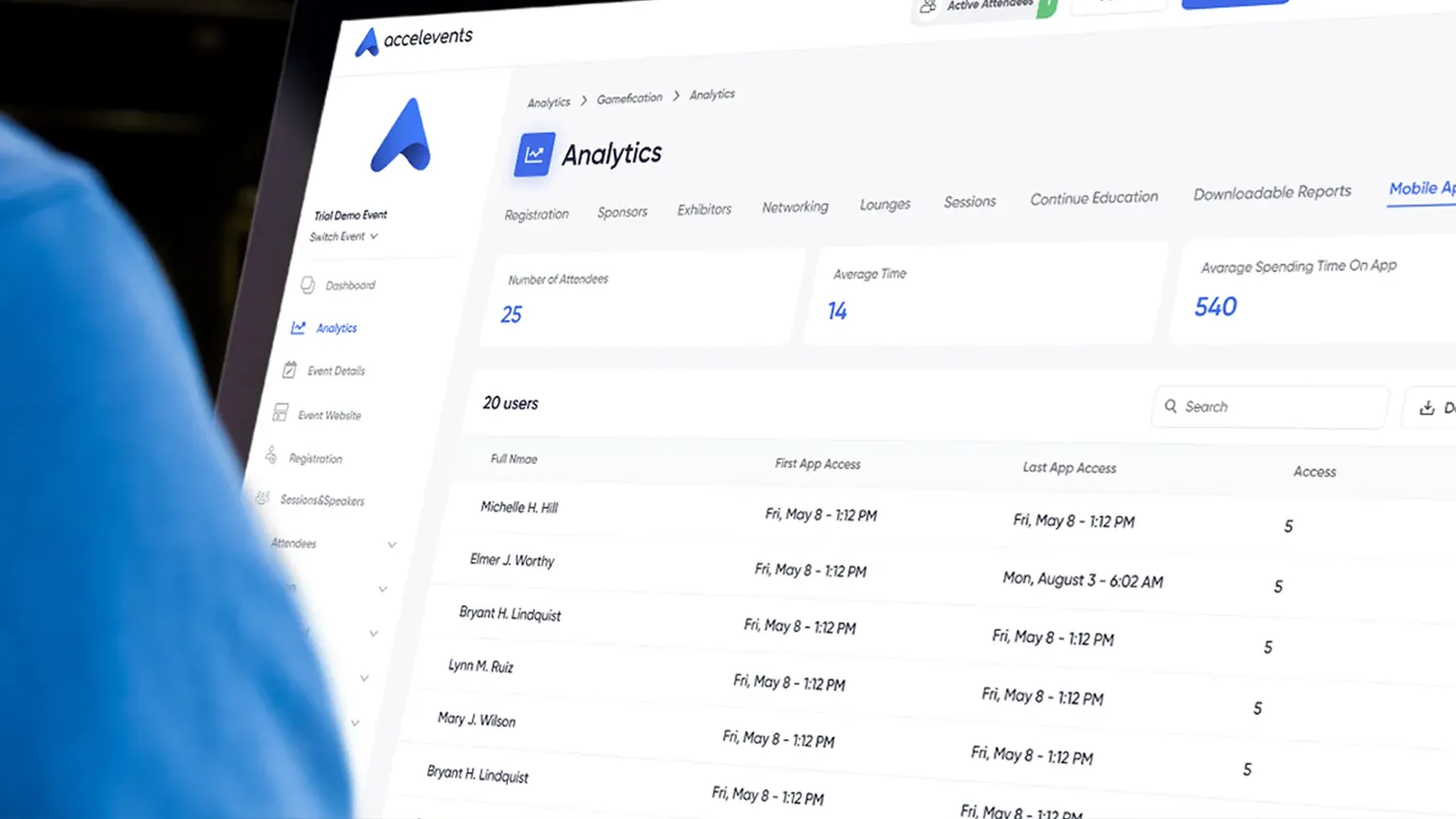
Watch completion in real time under Analytics, then Continuing Education, where each attendee shows a progress percentage. This gives you a live compliance status for every learner, plus downloadable reporting and analytics with session, date, time, and duration fields for auditors. Our support team, that responds in less than 21 seconds, 24/7, can help map sessions to credit rules during setup.
Automating Credit Assignment
Manual credit assignment is where most errors start. Because a criteria applies the same rule to everyone, a CEU tracking process that once meant spreadsheets becomes automatic. With Accelevents you can:
- Run multiple criteria for different credit types or a licensing board's requirements
- Combine live presentations, on-demand recordings, and surveys into one learning path
- Attach self-assessment questions and graded quizzes to any session
- Set pass or fail thresholds so credits assign the moment an attendee qualifies
This replaces a standalone CE tracker with automation that lives beside your agenda and check-in data.
Generating CE Certificates
Certificate generation should trigger on completion, not on a staffer's to-do list. Accelevents auto-populates the attendee name, credits earned, and provider details, then issues CE certificates the moment requirements are met. You can produce separate certificates of completion for pre-conference workshops, breakout tracks, or add-on courses, and attendees retrieve their own certificates of completion through self-service in the CE Credits menu.
Audit-Ready Reporting and Compliance
When an accrediting body asks for proof, the burden is on the organizer. Export attendee-level records with session, date, time, and duration fields, then filter by program, credit type, or learner group. Because attendance, assessment, and certificate data share one record, the numbers reconcile with the numbers behind them, which is what makes a CEU tracking audit defensible.
Connecting CE Data to Your LMS
Credit records are most useful when they reach the systems your teams already run. Accelevents exports attendance logs, quiz scores, and certificate records formatted for spreadsheets or your learning management system (LMS). Push the same data into that system or your customer relationship management (CRM) system to keep a complete course history for every attendee. For fully virtual programs, the same online tools that run your sessions feed the CEU tracker, so a member's course history stays current without duplicate entry.

Who Uses CE Credit Tracking
Credit tracking matters most for organizations that certify professionals. That includes enterprises running internal compliance training, associations managing member education, and specialized bodies such as medical, legal, and trade groups. These same teams often run annual conferences where CE credits are the reason attendees register. Accelevents supports each of these across in-person, virtual, and hybrid formats from one connected data model.
Request a demo to explore how Accelevents can simplify your event management process.
Frequently Asked Questions
How do I track continuing education units (CEUs) for attendees?
Track continuing education units (CEUs) with a platform that records session-level attendance and applies credit rules automatically. Accelevents captures attendance for each session, verifies participation with optional quizzes, assigns CE credits when requirements are met, and stores every record for export. It works the same way for in-person, virtual, and hybrid sessions.
How can I offer continuing education credits at my event?
To offer continuing education credits, choose an event platform that records attendance, verifies learning, and issues certificates for you. In Accelevents you build a continuing education criteria, set the contact hours or credits attendees earn, and attach a certificate. Attendees who meet the CE requirements receive their credits and certificate automatically.
How do I manage CE credits across multiple licensing boards?
Set up a separate criteria for each licensing board or credit type, then map eligible sessions to it. Accelevents runs multiple criteria at once and assigns a credit value per criteria. Credits do not multiply by the number of sessions in a criteria, so create separate criteria when you need per-session credit.
Can I track attendance at the session level for certification credits?
Yes. Certification credits usually require proof of time attended, so session-level tracking matters. Accelevents records attendance through check-in, check-in and check-out, or virtual watch-time, and shows a real-time compliance status for each attendee. You can export attendee-level records with session, date, time, and duration fields for auditors.
How does automatic CE certificate generation work?
When an attendee meets a criteria's attendance and assessment requirements, Accelevents generates a CE certificate automatically. It auto-populates the attendee name, credits earned, and provider details, then delivers certificates of completion for self-service download or print. You can issue separate certificates for workshops, breakout tracks, or add-on courses.
Can continuing education data export to a learning management system (LMS)?
Yes. Accelevents exports attendance logs, quiz scores, and certificate records formatted for spreadsheets or your learning management system (LMS). Filter by program, credit type, or learner group, then move the data into that system or your customer relationship management (CRM) system to keep each attendee's course history in one place.